
JavaScript Carousel Slider vs CSS
Slick's carousel slider and the CSS version, both with five slides. Slick runs in a sandboxed frame, CSS on the page.
CSS
scroll snap with ::scroll-button(*) and ::scroll-marker
Wins overall6 wins4 ties1 loss
On the laptop test, all 11 measures
Wins overall7 wins3 ties1 loss
On the slow phone test, all 11 measures
Wins overall6 wins5 ties0 losses
On the busy page test, all 11 measures
Slick
Slick 2.0.0
Loses overall1 win4 ties6 losses
On the laptop test, all 11 measures
Loses overall1 win3 ties7 losses
On the slow phone test, all 11 measures
Loses overall0 wins5 ties6 losses
On the busy page test, all 11 measures
38.1 KB of JavaScript, from jQuery 4.0.0 and Slick 2.0.0.
Who wins
CSS winsTieCSS loses
Against Slick
CSS wins 6, ties 4, loses 1
Against Vanilla JS
CSS wins 4, ties 6, loses 1
Against Slick
CSS wins 7, ties 3, loses 1
Against Vanilla JS
CSS wins 4, ties 7, loses 0
Against Slick
CSS wins 6, ties 5, loses 0
Against Vanilla JS
CSS wins 4, ties 7, loses 0
Tie: the middle half of runs overlap, or the medians sit under 16.7 ms apart (one frame at 60 frames a second). Bytes and lines compare exactly. While both layout shift scores are under 0.1 (Google's line for good), the winner is slightly ahead at most.
Head to head
CSS on the left, Slick on the right, one measure per row. Green marks who wins, red who loses, gray a tie.
JavaScript downloadedCSS wins
Everything downloadedCSS wins
Script time while loadingCSS wins
Time until it worksCSS wins
Lines of codeCSS wins
With JavaScript offCSS wins
Vanilla JavaScript: 1.8 KB of JavaScript, works at 37 ms, 253 lines to write, does not work with script off.
JavaScript downloadedCSS wins
Everything downloadedCSS wins
Script time while loadingCSS wins
Time until it worksCSS wins
Lines of codeCSS wins
With JavaScript offCSS wins
Vanilla JavaScript: 1.8 KB of JavaScript, works at 466 ms, 253 lines to write, does not work with script off.
JavaScript downloadedCSS wins
Everything downloadedCSS wins
Script time while loadingCSS wins
Time until it worksCSS wins
Lines of codeCSS wins
With JavaScript offCSS wins
Vanilla JavaScript: 1.8 KB of JavaScript, works at 34 ms, 253 lines to write, does not work with script off.
Laptop: 1280 x 800, no throttling. 15 runs per version in Chrome 157, Nov 25, 2026.
Phone, 4x slower: CPU 4x slower, slow 4G (150 ms round trip, 1.6 Mbps down, 750 kbps up), 390 x 844 at 2x. 15 runs per version in Chrome 157, Nov 25, 2026.
Busy page: 1280 x 800, other script holding the main thread for 50 ms of every 100 ms. 15 runs per version in Chrome 157, Nov 25, 2026.
Replace a JavaScript carousel slider using CSS
1Write the HTML structure
Every rule in the stylesheet is scoped under
.demo-scroll-carousel, so keep that wrapper or rename it in both files. Add or remove slides as your content requires.index.html22 lines
<!doctype html> <html lang="en"> <head> <meta charset="utf-8"> <meta name="viewport" content="width=device-width, initial-scale=1"> <title>Carousel: CSS scroll snap</title> <link rel="stylesheet" href="carousel.css"> </head> <body> <div class="demo-scroll-carousel"> <div class="carousel-wrap"> <div class="carousel"> <div class="carousel-slide">Slide 1 of 5</div> <div class="carousel-slide">Slide 2 of 5</div> <div class="carousel-slide">Slide 3 of 5</div> <div class="carousel-slide">Slide 4 of 5</div> <div class="carousel-slide">Slide 5 of 5</div> </div> </div> </div> </body> </html>2Create the scrolling and snapping behavior
overflow-x: autoon.carouselmakes the row scroll, andscroll-snap-type: x mandatorystops it on a slide.scroll-behavior: smoothanimates the arrow and dot moves in Chrome and Edge. The colors by:nth-child()and the accessible names for the dots are written for exactly five slides.carousel.css131 lines
/*
 * Carousel, CSS version: a scroll snap carousel with no script.
 * The arrows come from ::scroll-button() and the dots from ::scroll-marker (Chrome 135 and
 * later). The browser disables each arrow at its end and marks the dot for the slide in view.
 * Slides and colors are the ones on purecss.com/scroll-carousel/.
 * Icons: Font Awesome Free 7.3.1 arrow-left and arrow-right, CC BY 4.0,
 * https://fontawesome.com/license/free
 */

/* The arrows are placed against the wrap, so it is the positioned box */
.demo-scroll-carousel .carousel-wrap {
	position: relative;
	width: 100%;
	max-width: 520px;
	margin: 0 auto;
}

.demo-scroll-carousel .carousel {
	display: flex;
	overflow-x: auto;
	scroll-snap-type: x mandatory;
	scroll-behavior: smooth;
	/* hands the scroller to the compositor, so the arrows' smooth scroll keeps moving while the
	   page's main thread is busy (without it Chrome 157 scrolled this one on the main thread) */
	will-change: scroll-position;
	border-radius: 10px;
	scrollbar-width: none;
	/* the dots are drawn in a row after the carousel. With tabs, they are one Tab stop and the
	   arrow keys move between them (plain "after" makes each dot its own Tab stop). The first
	   line is a fallback, kept in case a browser reads "after" but not "after tabs" */
	scroll-marker-group: after;
	scroll-marker-group: after tabs;
}

.demo-scroll-carousel .carousel::-webkit-scrollbar {
	display: none;
}

.demo-scroll-carousel .carousel-slide {
	flex: 0 0 100%;
	height: 160px;
	scroll-snap-align: start;
	/* a fast swipe stops at the next slide instead of flying past it */
	scroll-snap-stop: always;
	display: flex;
	align-items: center;
	justify-content: center;
	font-size: 1.2rem;
	font-weight: 700;
	color: #0c0c0d;
	-webkit-user-select: none;
	user-select: none;
}

.demo-scroll-carousel .carousel-slide:nth-child(1) { background: #c084fc; }
.demo-scroll-carousel .carousel-slide:nth-child(2) { background: #38bdf8; }
.demo-scroll-carousel .carousel-slide:nth-child(3) { background: #ffd444; }
.demo-scroll-carousel .carousel-slide:nth-child(4) { background: #57d9a3; }
.demo-scroll-carousel .carousel-slide:nth-child(5) { background: #b8ff57; }

/* Arrows. Each click scrolls one slide; the text after the slash is the button's name */
.demo-scroll-carousel .carousel::scroll-button(*) {
	/* a page's *::before, *::after reset does not reach these pseudo-elements */
	box-sizing: border-box;
	position: absolute;
	/* half the slide height, so the arrow sits on the slide's middle */
	top: 80px;
	width: 40px;
	height: 40px;
	margin-top: -20px;
	padding: 0;
	border: 0;
	border-radius: 50%;
	background-color: rgba(24, 22, 29, .6);
	background-position: center;
	background-size: 16px 16px;
	background-repeat: no-repeat;
	cursor: pointer;
}

.demo-scroll-carousel .carousel::scroll-button(left) {
	content: "" / "Previous slide";
	left: 8px;
	background-image: url("data:image/svg+xml,%3Csvg xmlns='http://www.w3.org/2000/svg' viewBox='0 0 512 512'%3E%3Cpath fill='%23fff' d='M9.4 233.4c-12.5 12.5-12.5 32.8 0 45.3l160 160c12.5 12.5 32.8 12.5 45.3 0s12.5-32.8 0-45.3L109.3 288 480 288c17.7 0 32-14.3 32-32s-14.3-32-32-32l-370.7 0 105.4-105.4c12.5-12.5 12.5-32.8 0-45.3s-32.8-12.5-45.3 0l-160 160z'/%3E%3C/svg%3E");
}

.demo-scroll-carousel .carousel::scroll-button(right) {
	content: "" / "Next slide";
	right: 8px;
	background-image: url("data:image/svg+xml,%3Csvg xmlns='http://www.w3.org/2000/svg' viewBox='0 0 512 512'%3E%3Cpath fill='%23fff' d='M502.6 278.6c12.5-12.5 12.5-32.8 0-45.3l-160-160c-12.5-12.5-32.8-12.5-45.3 0s-12.5 32.8 0 45.3L402.7 224 32 224c-17.7 0-32 14.3-32 32s14.3 32 32 32l370.7 0-105.4 105.4c-12.5 12.5-12.5 32.8 0 45.3s32.8 12.5 45.3 0l160-160z'/%3E%3C/svg%3E");
}

/* the browser disables an arrow when there is no slide left in its direction */
.demo-scroll-carousel .carousel::scroll-button(*):disabled {
	opacity: .35;
	cursor: default;
}

.demo-scroll-carousel .carousel::scroll-button(*):focus-visible {
	outline: 2px solid #18161d;
	outline-offset: 2px;
}

/* Dots: one marker per slide, in a 20px box with a 10px dot inside */
.demo-scroll-carousel .carousel::scroll-marker-group {
	display: flex;
	justify-content: center;
	gap: 10px;
	height: 20px;
	margin: 5px 0;
}

.demo-scroll-carousel .carousel-slide::scroll-marker {
	content: "";
	box-sizing: border-box;
	width: 20px;
	height: 20px;
	border: 5px solid transparent;
	border-radius: 50%;
	background: rgba(24, 22, 29, .25) padding-box;
	cursor: pointer;
}

/* the text after the slash names each dot for screen readers */
.demo-scroll-carousel .carousel-slide:nth-child(1)::scroll-marker { content: "" / "Slide 1"; }
.demo-scroll-carousel .carousel-slide:nth-child(2)::scroll-marker { content: "" / "Slide 2"; }
.demo-scroll-carousel .carousel-slide:nth-child(3)::scroll-marker { content: "" / "Slide 3"; }
.demo-scroll-carousel .carousel-slide:nth-child(4)::scroll-marker { content: "" / "Slide 4"; }
.demo-scroll-carousel .carousel-slide:nth-child(5)::scroll-marker { content: "" / "Slide 5"; }

/* the dot for the slide in view */
.demo-scroll-carousel .carousel-slide::scroll-marker:target-current {
	background-color: rgba(24, 22, 29, .75);
}

.demo-scroll-carousel .carousel-slide::scroll-marker:focus-visible {
	outline: 2px solid #18161d;
	outline-offset: 1px;
}

@media (prefers-reduced-motion: reduce) {
	.demo-scroll-carousel .carousel {
		scroll-behavior: auto;
		transition: none;
		animation: none;
	}
}
The numbers
What each version downloads
Bytes downloadedCSS winsCSS winsCSS wins
Every file, gzipped. The solid part of a bar is JavaScript, the light part is HTML, CSS, images and fonts.
Download time on a slow phone connection
Worked out from the byte counts at the phone test's 1.6 Mbps download speed.
See the numbers
| File | Kind | Bytes | Time on slow 4G |
|---|---|---|---|
| CSS: carousel.css | CSS | 1,907 | 9.5 ms |
| CSS: index.html | HTML | 309 | 1.5 ms |
| CSS total | 2,216 | 11 ms | |
| Vanilla JS: carousel.js | JavaScript | 1,766 | 8.8 ms |
| Vanilla JS: carousel.css | CSS | 1,563 | 7.8 ms |
| Vanilla JS: index.html | HTML | 570 | 2.9 ms |
| Vanilla JS total | 3,899 | 19 ms | |
| Slick: init.js | JavaScript | 303 | 1.5 ms |
| Slick: jquery.min.js | JavaScript | 27,530 | 138 ms |
| Slick: slick.min.js | JavaScript | 10,248 | 51 ms |
| Slick: carousel.css | CSS | 1,184 | 5.9 ms |
| Slick: slick-theme.css | CSS | 814 | 4.1 ms |
| Slick: slick.css | CSS | 518 | 2.6 ms |
| Slick: index.html | HTML | 374 | 1.9 ms |
| Slick: ajax-loader.gif | Image or font | 2,556 | 13 ms |
| Slick: slick.woff2 | Image or font | 820 | 4.1 ms |
| Slick total | 44,347 | 222 ms |
Time on slow 4G = bytes x 8 / 1,600,000 bits per second. Round trips and parsing are not counted.
Waiting before it works
Time until it worksTie with Vanilla JSTie with Vanilla JSTie with Vanilla JS
From the page start to the first click that works.
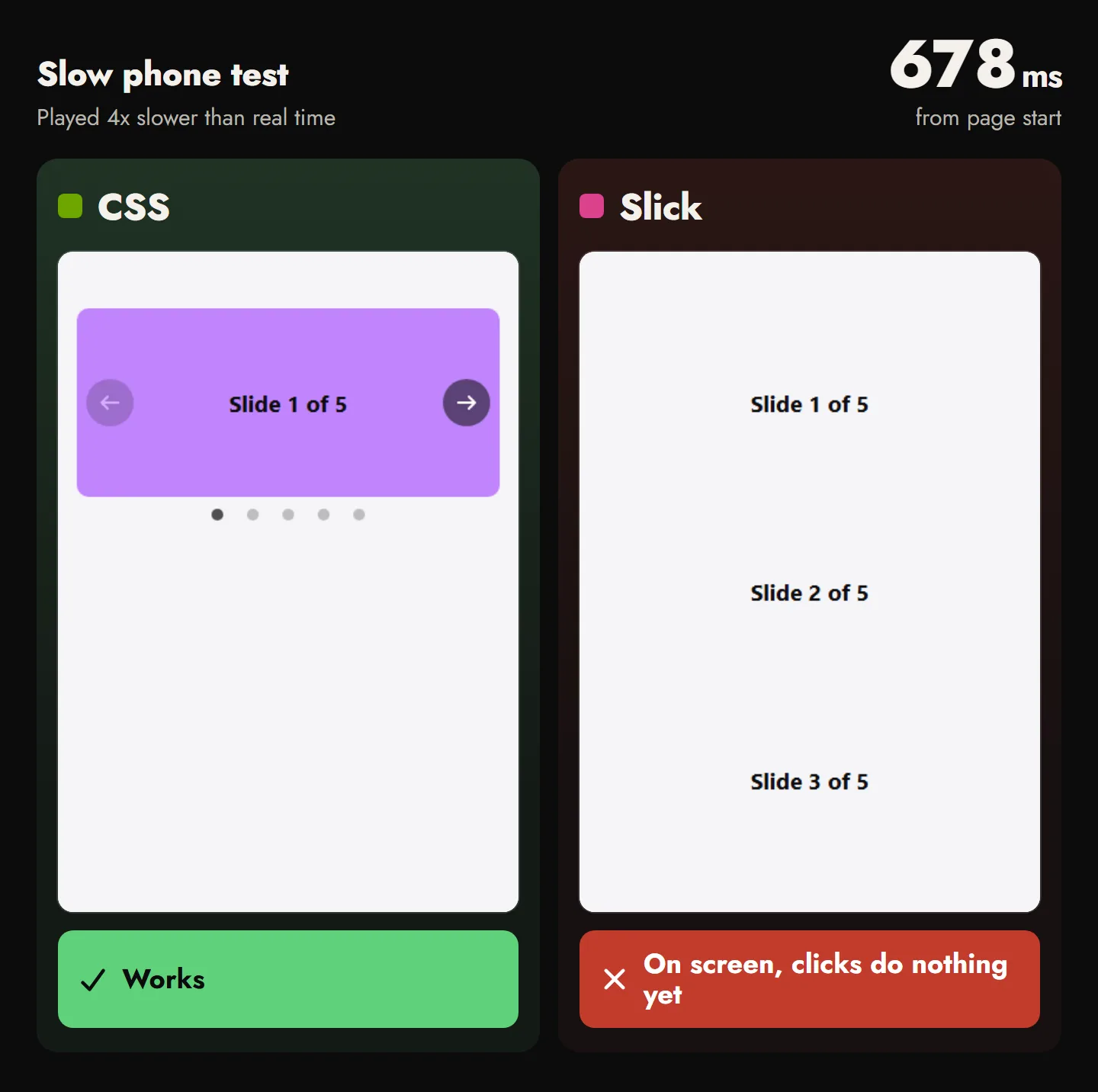
Nothing on screenOn screen, clicks do nothing yetWorks
With JavaScript off
See the numbers
| Version | First paint | Works at | Clicks do nothing for | JavaScript off |
|---|---|---|---|---|
| CSS | 36 ms | 36 ms | 0 ms | Works |
| Vanilla JS | 37 ms | 37 ms | 0 ms | Does not work |
| Slick | 32 ms | 69 ms | 37 ms | Shows, clicks do nothing |
Nothing on screenOn screen, clicks do nothing yetWorks
With JavaScript off
See the numbers
| Version | First paint | Works at | Clicks do nothing for | JavaScript off |
|---|---|---|---|---|
| CSS | 474 ms | 474 ms | 0 ms | Works |
| Vanilla JS | 460 ms | 466 ms | 5.2 ms | Does not work |
| Slick | 450 ms | 862 ms | 412 ms | Shows, clicks do nothing |
Nothing on screenOn screen, clicks do nothing yetWorks
With JavaScript off
See the numbers
| Version | First paint | Works at | Clicks do nothing for | JavaScript off |
|---|---|---|---|---|
| CSS | 33 ms | 33 ms | 0 ms | Works |
| Vanilla JS | 34 ms | 34 ms | 0 ms | Does not work |
| Slick | 32 ms | 70 ms | 38 ms | Shows, clicks do nothing |
Main thread while loading
Blocking timeTie with Vanilla JSTie with Vanilla JSTie with Slick
The main thread's tasks in one typical run. A long task blocks any click that arrives during it.
Main thread taskPart past 50 ms: a long task
See the numbers
| Version | Starts at | Lasts | Long task |
|---|---|---|---|
| CSS | 0 ms blocking (median) | 0 ms script (median) | 0 long (median) |
| CSS task | 7.3 ms | 6.0 ms | |
| CSS task | 17 ms | 13 ms | |
| Vanilla JS | 0 ms blocking (median) | 1.1 ms script (median) | 0 long (median) |
| Vanilla JS task | 7.1 ms | 7.3 ms | |
| Vanilla JS task | 22 ms | 13 ms | |
| Slick | 0 ms blocking (median) | 36 ms script (median) | 0 long (median) |
| Slick task | 6.2 ms | 5.8 ms | |
| Slick task | 20 ms | 7.9 ms | |
| Slick task | 29 ms | 4.7 ms | |
| Slick task | 35 ms | 30 ms |
Main thread taskPart past 50 ms: a long task
See the numbers
| Version | Starts at | Lasts | Long task |
|---|---|---|---|
| CSS | 0 ms blocking (median) | 0 ms script (median) | 1 long (median) |
| CSS task | 177 ms | 25 ms | |
| CSS task | 390 ms | 54 ms | 4.0 ms past 50 ms |
| CSS task | 3,529 ms | 6.5 ms | |
| CSS task | 3,536 ms | 6.4 ms | |
| Vanilla JS | 0 ms blocking (median) | 4.2 ms script (median) | 1 long (median) |
| Vanilla JS task | 176 ms | 42 ms | |
| Vanilla JS task | 408 ms | 58 ms | 7.5 ms past 50 ms |
| Vanilla JS task | 469 ms | 8.5 ms | |
| Vanilla JS task | 3,493 ms | 5.9 ms | |
| Vanilla JS task | 3,499 ms | 7.7 ms | |
| Slick | 134 ms blocking (median) | 232 ms script (median) | 1 long (median) |
| Slick task | 189 ms | 39 ms | |
| Slick task | 235 ms | 4.3 ms | |
| Slick task | 414 ms | 33 ms | |
| Slick task | 627 ms | 39 ms | |
| Slick task | 667 ms | 7.1 ms | |
| Slick task | 676 ms | 5.1 ms | |
| Slick task | 682 ms | 184 ms | 134 ms past 50 ms |
| Slick task | 866 ms | 6.5 ms | |
| Slick task | 956 ms | 4.7 ms | |
| Slick task | 3,748 ms | 5.2 ms | |
| Slick task | 3,754 ms | 7.3 ms |
Main thread taskPart past 50 ms: a long task
See the numbers
| Version | Starts at | Lasts | Long task |
|---|---|---|---|
| CSS | 1.1 ms blocking (median) | 0 ms script (median) | 13 long (median) |
| CSS task | 9.3 ms | 8.6 ms | |
| CSS task | 22 ms | 18 ms | |
| CSS task | 118 ms | 51 ms | 0.5 ms past 50 ms |
| CSS task | 229 ms | 50 ms | 0.1 ms past 50 ms |
| CSS task | 329 ms | 50 ms | 0.1 ms past 50 ms |
| CSS task | 426 ms | 50 ms | |
| CSS task | 528 ms | 50 ms | 0.1 ms past 50 ms |
| CSS task | 626 ms | 50 ms | |
| CSS task | 728 ms | 50 ms | |
| CSS task | 824 ms | 50 ms | |
| CSS task | 926 ms | 50 ms | |
| CSS task | 1,025 ms | 50 ms | |
| CSS task | 1,124 ms | 50 ms | |
| CSS task | 1,224 ms | 50 ms | |
| CSS task | 1,319 ms | 50 ms | 0.1 ms past 50 ms |
| CSS task | 1,430 ms | 50 ms | |
| CSS task | 1,527 ms | 50 ms | 0.1 ms past 50 ms |
| Vanilla JS | 1.2 ms blocking (median) | 1.2 ms script (median) | 14 long (median) |
| Vanilla JS task | 7.2 ms | 5.7 ms | |
| Vanilla JS task | 20 ms | 10 ms | |
| Vanilla JS task | 114 ms | 50 ms | 0.3 ms past 50 ms |
| Vanilla JS task | 227 ms | 50 ms | |
| Vanilla JS task | 313 ms | 50 ms | 0.1 ms past 50 ms |
| Vanilla JS task | 422 ms | 50 ms | 0.1 ms past 50 ms |
| Vanilla JS task | 522 ms | 50 ms | |
| Vanilla JS task | 619 ms | 50 ms | 0.1 ms past 50 ms |
| Vanilla JS task | 723 ms | 50 ms | 0.1 ms past 50 ms |
| Vanilla JS task | 822 ms | 50 ms | 0.1 ms past 50 ms |
| Vanilla JS task | 923 ms | 50 ms | 0.1 ms past 50 ms |
| Vanilla JS task | 1,019 ms | 50 ms | 0.1 ms past 50 ms |
| Vanilla JS task | 1,125 ms | 50 ms | 0.1 ms past 50 ms |
| Vanilla JS task | 1,223 ms | 50 ms | 0.1 ms past 50 ms |
| Vanilla JS task | 1,326 ms | 50 ms | 0.1 ms past 50 ms |
| Vanilla JS task | 1,419 ms | 50 ms | |
| Vanilla JS task | 1,523 ms | 50 ms | |
| Slick | 1.0 ms blocking (median) | 35 ms script (median) | 13 long (median) |
| Slick task | 5.6 ms | 5.3 ms | |
| Slick task | 18 ms | 7.1 ms | |
| Slick task | 26 ms | 4.3 ms | |
| Slick task | 33 ms | 29 ms | |
| Slick task | 112 ms | 50 ms | 0.1 ms past 50 ms |
| Slick task | 217 ms | 50 ms | |
| Slick task | 316 ms | 50 ms | |
| Slick task | 412 ms | 50 ms | 0.1 ms past 50 ms |
| Slick task | 513 ms | 50 ms | |
| Slick task | 624 ms | 50 ms | 0.2 ms past 50 ms |
| Slick task | 715 ms | 50 ms | 0.1 ms past 50 ms |
| Slick task | 813 ms | 50 ms | 0.1 ms past 50 ms |
| Slick task | 911 ms | 50 ms | |
| Slick task | 1,012 ms | 50 ms | |
| Slick task | 1,121 ms | 50 ms | |
| Slick task | 1,216 ms | 50 ms | 0.1 ms past 50 ms |
| Slick task | 1,313 ms | 50 ms | |
| Slick task | 1,415 ms | 50 ms | |
| Slick task | 1,513 ms | 50 ms | |
| Slick task | 1,614 ms | 50 ms | 0.1 ms past 50 ms |
Shows on screen after a click
Shows after a clickSlick winsSlick winsTie with Slick
Every run is a dot. The line marks the median.
One runMedian
See the numbers
| Version | Median | Middle half of runs | Every run (ms) |
|---|---|---|---|
| CSS | 42 ms | 39 ms to 43 ms | 44, 42, 40, 50, 42, 33, 32, 43, 43, 42, 35, 41, 37, 42, 40 |
| Vanilla JS | 24 ms | 22 ms to 25 ms | 27, 24, 24, 18, 25, 22, 25, 24, 28, 25, 22, 24, 22, 24, 17 |
| Slick | 23 ms | 16 ms to 25 ms | 26, 24, 17, 16, 15, 13, 24, 27, 26, 26, 23, 23, 17, 22, 14 |
One runMedian
See the numbers
| Version | Median | Middle half of runs | Every run (ms) |
|---|---|---|---|
| CSS | 55 ms | 47 ms to 58 ms | 47, 56, 55, 55, 60, 52, 51, 62, 45, 47, 64, 58, 40, 40, 58 |
| Vanilla JS | 39 ms | 33 ms to 44 ms | 40, 42, 49, 39, 39, 46, 29, 23, 40, 48, 31, 33, 34, 50, 35 |
| Slick | 38 ms | 37 ms to 43 ms | 50, 38, 50, 37, 42, 43, 84, 36, 38, 33, 30, 42, 42, 32, 37 |
One runMedian
See the numbers
| Version | Median | Middle half of runs | Every run (ms) |
|---|---|---|---|
| CSS | 84 ms | 37 ms to 91 ms | 90, 36, 33, 91, 91, 91, 30, 94, 28, 93, 43, 39, 40, 89, 84 |
| Vanilla JS | 69 ms | 62 ms to 74 ms | 79, 73, 17, 15, 67, 69, 64, 74, 61, 33, 74, 69, 73, 78, 73 |
| Slick | 68 ms | 23 ms to 73 ms | 75, 19, 69, 20, 68, 73, 13, 76, 27, 73, 25, 75, 71, 22, 24 |
Smoothness while it moves
Frames that changedTie with Vanilla JSTie with Vanilla JSTie with Vanilla JS
One typical run, from its first changed frame. A short tick marks a frame where the picture stayed the same.
Frame that changed the pictureFrame painted, picture stillLongest still stretch
See the numbers
| Version | Frames that changed | Longest still | Pictures | This run started moving at | Its frames (ms after it started) |
|---|---|---|---|---|---|
| CSS | 100% | 17 ms | 22 | 43 ms | 0, 17, 33, 50, 67, 83, 100, 117, 133, 150, 167, 183, 200, 217, 233, 250, 267, 283, 300, 317, 333, 350 |
| Vanilla JS | 100% | 17 ms | 32 | 24 ms | 0, 17, 33, 50, 67, 83, 100, 117, 133, 150, 167, 183, 200, 217, 233, 250, 267, 283, 300, 317, 333, 350, 367, 383, 400, 417, 433, 450, 467, 483, 500, 517 |
| Slick | 100% | 17 ms | 31 | 27 ms | 0, 17, 33, 50, 67, 83, 100, 117, 133, 150, 167, 183, 200, 217, 233, 250, 267, 283, 300, 317, 333, 350, 367, 383, 400, 417, 433, 450, 467, 483, 500 |
Frame that changed the pictureFrame painted, picture stillLongest still stretch
See the numbers
| Version | Frames that changed | Longest still | Pictures | This run started moving at | Its frames (ms after it started) |
|---|---|---|---|---|---|
| CSS | 100% | 17 ms | 18 | 62 ms | 0, 17, 33, 50, 67, 83, 100, 117, 133, 150, 167, 183, 200, 217, 233, 250, 267, 283 |
| Vanilla JS | 100% | 17 ms | 32 | 23 ms | 0, 17, 33, 50, 67, 83, 100, 117, 133, 150, 167, 183, 200, 217, 233, 250, 267, 283, 300, 317, 333, 350, 367, 383, 400, 417, 433, 450, 467, 483, 500, 517 |
| Slick | 100% | 17 ms | 31 | 36 ms | 0, 17, 33, 50, 67, 83, 100, 117, 133, 150, 167, 183, 200, 217, 233, 250, 267, 283, 300, 317, 333, 350, 367, 383, 400, 417, 433, 450, 467, 483, 500 |
Frame that changed the pictureFrame painted, picture stillLongest still stretch
See the numbers
| Version | Frames that changed | Longest still | Pictures | This run started moving at | Its frames (ms after it started) |
|---|---|---|---|---|---|
| CSS | 100% | 17 ms | 22 | 40 ms | 0, 17, 33, 50, 67, 83, 100, 117, 133, 150, 167, 183, 200, 217, 233, 250, 267, 283, 300, 317, 333, 350 |
| Vanilla JS | 100% | 17 ms | 32 | 33 ms | 0, 17, 33, 50, 67, 83, 100, 117, 133, 150, 167, 183, 200, 217, 233, 250, 267, 283, 300, 317, 333, 350, 367, 383, 400, 417, 433, 450, 467, 483, 500, 517 |
| Slick | 100% | 17 ms | 31 | 76 ms | 0, 17, 33, 50, 67, 83, 100, 117, 133, 150, 167, 183, 200, 217, 233, 250, 267, 283, 300, 317, 333, 350, 367, 383, 400, 417, 433, 450, 467, 483, 500 |
Measure by measure
- Against Slick: CSS wins 6 of 11, ties 4, loses 1.
- Against Vanilla JS: CSS wins 4 of 11, ties 6, loses 1.
CSS ahead: far (3x or more), ahead (1.5x to 3x), slightlyTieJavaScript ahead, the same steps
Tie: the middle half of runs overlap, or the medians sit under 16.7 ms apart (one frame at 60 frames a second). Bytes and lines compare exactly. While both layout shift scores are under 0.1 (Google's line for good), the winner is slightly ahead at most.
| Measure | CSS against Slick | CSS against Vanilla JS |
|---|---|---|
| Bytes downloaded | CSS far aheadCSS2.2 KBSlick44.3 KB | CSS aheadCSS2.2 KBVanilla JS3.9 KB |
| JavaScript downloaded | CSS far aheadCSS0 KBSlick38.1 KB | CSS far aheadCSS0 KBVanilla JS1.8 KB |
| Script time while loading | CSS far aheadCSS0 msSlick36 ms | TieCSS0 msVanilla JS1.1 ms |
| Blocking time | TieCSS0 msSlick0 ms | TieCSS0 msVanilla JS0 ms |
| Time until it works | CSS aheadCSS36 msSlick69 ms | TieCSS36 msVanilla JS37 ms |
| Layout shift while loading | TieCSS0Slick0 | TieCSS0Vanilla JS0 |
| Shows after a click | Slick aheadCSS42 msSlick23 ms | Vanilla JS aheadCSS42 msVanilla JS24 ms |
| Click response | TieCSS9.3 msSlick4.7 ms | TieCSS9.3 msVanilla JS3.9 ms |
| Frames that changed | TieCSS100%Slick100% | TieCSS100%Vanilla JS100% |
| Works with JavaScript off | CSS far aheadCSSworksSlickshows, clicks do nothing | CSS far aheadCSSworksVanilla JSdoes not work |
| Lines of code | CSS far aheadCSS153 linesSlick10,431 lines | CSS aheadCSS153 linesVanilla JS253 lines |
- Against Slick: CSS wins 7 of 11, ties 3, loses 1.
- Against Vanilla JS: CSS wins 4 of 11, ties 7, loses 0.
CSS ahead: far (3x or more), ahead (1.5x to 3x), slightlyTieJavaScript ahead, the same steps
Tie: the middle half of runs overlap, or the medians sit under 16.7 ms apart (one frame at 60 frames a second). Bytes and lines compare exactly. While both layout shift scores are under 0.1 (Google's line for good), the winner is slightly ahead at most.
| Measure | CSS against Slick | CSS against Vanilla JS |
|---|---|---|
| Bytes downloaded | CSS far aheadCSS2.2 KBSlick44.3 KB | CSS aheadCSS2.2 KBVanilla JS3.9 KB |
| JavaScript downloaded | CSS far aheadCSS0 KBSlick38.1 KB | CSS far aheadCSS0 KBVanilla JS1.8 KB |
| Script time while loading | CSS far aheadCSS0 msSlick232 ms | TieCSS0 msVanilla JS4.2 ms |
| Blocking time | CSS far aheadCSS0 msSlick134 ms | TieCSS0 msVanilla JS0 ms |
| Time until it works | CSS aheadCSS474 msSlick862 ms | TieCSS474 msVanilla JS466 ms |
| Layout shift while loading | TieCSS0Slick0 | TieCSS0Vanilla JS0 |
| Shows after a click | Slick slightly aheadCSS55 msSlick38 ms | TieCSS55 msVanilla JS39 ms |
| Click response | TieCSS12 msSlick20 ms | TieCSS12 msVanilla JS13 ms |
| Frames that changed | TieCSS100%Slick100% | TieCSS100%Vanilla JS100% |
| Works with JavaScript off | CSS far aheadCSSworksSlickshows, clicks do nothing | CSS far aheadCSSworksVanilla JSdoes not work |
| Lines of code | CSS far aheadCSS153 linesSlick10,431 lines | CSS aheadCSS153 linesVanilla JS253 lines |
- Against Slick: CSS wins 6 of 11, ties 5, loses 0.
- Against Vanilla JS: CSS wins 4 of 11, ties 7, loses 0.
CSS ahead: far (3x or more), ahead (1.5x to 3x), slightlyTieJavaScript ahead, the same steps
Tie: the middle half of runs overlap, or the medians sit under 16.7 ms apart (one frame at 60 frames a second). Bytes and lines compare exactly. While both layout shift scores are under 0.1 (Google's line for good), the winner is slightly ahead at most.
| Measure | CSS against Slick | CSS against Vanilla JS |
|---|---|---|
| Bytes downloaded | CSS far aheadCSS2.2 KBSlick44.3 KB | CSS aheadCSS2.2 KBVanilla JS3.9 KB |
| JavaScript downloaded | CSS far aheadCSS0 KBSlick38.1 KB | CSS far aheadCSS0 KBVanilla JS1.8 KB |
| Script time while loading | CSS far aheadCSS0 msSlick35 ms | TieCSS0 msVanilla JS1.2 ms |
| Blocking time | TieCSS1.1 msSlick1.0 ms | TieCSS1.1 msVanilla JS1.2 ms |
| Time until it works | CSS aheadCSS33 msSlick70 ms | TieCSS33 msVanilla JS34 ms |
| Layout shift while loading | TieCSS0Slick0 | TieCSS0Vanilla JS0 |
| Shows after a click | TieCSS84 msSlick68 ms | TieCSS84 msVanilla JS69 ms |
| Click response | TieCSS3.1 msSlick4.5 ms | TieCSS3.1 msVanilla JS3.3 ms |
| Frames that changed | TieCSS100%Slick100% | TieCSS100%Vanilla JS100% |
| Works with JavaScript off | CSS far aheadCSSworksSlickshows, clicks do nothing | CSS far aheadCSSworksVanilla JSdoes not work |
| Lines of code | CSS far aheadCSS153 linesSlick10,431 lines | CSS aheadCSS153 linesVanilla JS253 lines |
The code
Writing the Slick version takes fewer lines: 125 against 153 for CSS. Count Slick's library code and the total reverses: 10,431 for Slick, 153 for CSS.
Lines of code
Lines of codeCSS wins
What you write, plus the library code the page loads, counted from the library's readable source.
You writeThe library bringsIn each version's color
See the numbers
| File | Kind | Lines |
|---|---|---|
| CSS: carousel.css | You write, CSS | 131 |
| CSS: index.html | You write, HTML | 22 |
| CSS total | 153 you write, 0 from the library | 153 |
| Vanilla JS: carousel.css | You write, CSS | 120 |
| Vanilla JS: carousel.js | You write, JavaScript | 99 |
| Vanilla JS: index.html | You write, HTML | 34 |
| Vanilla JS total | 253 you write, 0 from the library | 253 |
| Slick: carousel.css | You write, CSS | 89 |
| Slick: index.html | You write, HTML | 27 |
| Slick: init.js | You write, JavaScript | 9 |
| Slick: slick-carousel/slick/slick.css | Library, CSS | 84 |
| Slick: slick-carousel/slick/slick-theme.css | Library, CSS | 144 |
| Slick: jquery/dist/jquery.js | Library, JavaScript | 7,877 |
| Slick: slick-carousel/slick/slick.js | Library, JavaScript | 2,201 |
| Slick total | 125 you write, 10,306 from the library | 10,431 |
The Slick version125 lines in 3 files
index.html27 lines
<!doctype html>
<html lang="en">
<head>
<meta charset="utf-8">
<meta name="viewport" content="width=device-width, initial-scale=1">
<title>Carousel: Slick 2.0.0</title>
<link rel="stylesheet" href="/vendor/slick-carousel/slick/slick.css">
<link rel="stylesheet" href="/vendor/slick-carousel/slick/slick-theme.css">
<link rel="stylesheet" href="carousel.css">
</head>
<body>
<div class="demo-scroll-carousel">
	<div class="carousel-wrap">
		<div class="carousel">
			<div class="carousel-slide">Slide 1 of 5</div>
			<div class="carousel-slide">Slide 2 of 5</div>
			<div class="carousel-slide">Slide 3 of 5</div>
			<div class="carousel-slide">Slide 4 of 5</div>
			<div class="carousel-slide">Slide 5 of 5</div>
		</div>
	</div>
</div>
<script src="/vendor/jquery/dist/jquery.min.js"></script>
<script src="/vendor/slick-carousel/slick/slick.min.js"></script>
<script src="init.js"></script>
</body>
</html>carousel.css89 lines
/*
 * Carousel, library version: Slick 2.0.0 with its own slick.css and slick-theme.css.
 * This file only styles. It gives the slides their size and colors, and moves the theme's
 * arrows and dots to where the other two versions draw theirs (the theme puts white arrows
 * outside the slider, where they vanish on a light page). Nothing here changes how Slick behaves.
 */

.demo-scroll-carousel .carousel-wrap {
	position: relative;
	width: 100%;
	max-width: 520px;
	margin: 0 auto;
	/* Slick writes pixel widths on its slides and track. Inside a grid or flex item (the page
	   shell is a grid) those widths push the column wider than a phone screen, so the wrap
	   keeps its content out of its parent's sizing */
	contain: inline-size;
}

.demo-scroll-carousel .slick-list {
	border-radius: 10px;
}

.demo-scroll-carousel .carousel-slide {
	/* Slick's default rows: 1 wraps each slide in two divs and sets an inline
	   display: inline-block on it, so centering the text needs !important */
	display: flex !important;
	height: 160px;
	align-items: center;
	justify-content: center;
	font-size: 1.2rem;
	font-weight: 700;
	color: #0c0c0d;
	-webkit-user-select: none;
	user-select: none;
}

/* after the wrapping, the slides are counted on Slick's outer .slick-slide boxes */
.demo-scroll-carousel .slick-slide:nth-child(1) .carousel-slide { background: #c084fc; }
.demo-scroll-carousel .slick-slide:nth-child(2) .carousel-slide { background: #38bdf8; }
.demo-scroll-carousel .slick-slide:nth-child(3) .carousel-slide { background: #ffd444; }
.demo-scroll-carousel .slick-slide:nth-child(4) .carousel-slide { background: #57d9a3; }
.demo-scroll-carousel .slick-slide:nth-child(5) .carousel-slide { background: #b8ff57; }

/* Arrows: the theme's icon font glyphs, on a dark circle inside the slide's edges */
.demo-scroll-carousel .slick-arrow,
.demo-scroll-carousel .slick-arrow:hover,
.demo-scroll-carousel .slick-arrow:focus {
	z-index: 1;
	width: 40px;
	height: 40px;
	border-radius: 50%;
	background: rgba(24, 22, 29, .6);
}

.demo-scroll-carousel .slick-prev {
	left: 8px;
}

.demo-scroll-carousel .slick-next {
	right: 8px;
}

.demo-scroll-carousel .slick-arrow:before {
	font-size: 16px;
	opacity: 1;
}

/* Slick marks the arrow at each end with .slick-disabled and aria-disabled */
.demo-scroll-carousel .slick-arrow.slick-disabled {
	opacity: .35;
	cursor: default;
}

.demo-scroll-carousel .slick-arrow:focus-visible {
	outline: 2px solid #18161d;
	outline-offset: 2px;
}

/* Dots: the theme's 20px boxes 30px apart, drawn as a 10px dot */
.demo-scroll-carousel .slick-dots li button:before {
	content: "";
	top: 5px;
	left: 5px;
	width: 10px;
	height: 10px;
	border-radius: 50%;
	background: #18161d;
}

.demo-scroll-carousel .slick-dots li button:focus-visible {
	outline: 2px solid #18161d;
	outline-offset: 1px;
	border-radius: 50%;
}

@media (prefers-reduced-motion: reduce) {
	/* Slick writes its transition inline on the track, so only !important turns it off */
	.demo-scroll-carousel .slick-track {
		transition: none !important;
		animation: none;
	}
}init.js9 lines
// Slick 2.0.0, started the way the package's own demo page does it.
// Every other option keeps its default: speed 500 and cssEase 'ease' (slick.js lines 91 and 64).
$(function () {
	$('.carousel').slick({
		arrows: true, // already the default (slick.js line 56), written out for clarity
		dots: true, // default false; the shared behavior has one dot per slide
		infinite: false // default true, which loops; the shared behavior stops at both ends
	});
});| File | Kind | Size |
|---|---|---|
slick.css | CSS | 0.5 KB |
slick-theme.css | CSS | 0.8 KB |
jquery.min.js | JavaScript | 27.5 KB |
slick.min.js | JavaScript | 10.2 KB |
ajax-loader.gif | Image | 2.6 KB |
slick.woff2 | Image or font | 0.8 KB |
| Total | 42.5 KB |
The vanilla JavaScript version253 lines in 3 files
This version holds the slide move at 500 ms to match Slick. It listens for pointerdown, pointermove, pointerup and pointercancel to follow a mouse drag, and supports arrow, Home and End keys.
index.html34 lines
<!doctype html>
<html lang="en">
<head>
<meta charset="utf-8">
<meta name="viewport" content="width=device-width, initial-scale=1">
<title>Carousel: vanilla JavaScript</title>
<link rel="stylesheet" href="carousel.css">
<script src="carousel.js" defer></script>
</head>
<body>
<div class="demo-scroll-carousel">
	<div class="carousel-wrap" role="region" aria-roledescription="carousel" aria-label="Slides">
		<div class="carousel" aria-live="polite">
			<div class="carousel-track">
				<div class="carousel-slide" id="carousel-slide-1" role="tabpanel" aria-roledescription="slide" aria-label="1 of 5">Slide 1 of 5</div>
				<div class="carousel-slide" id="carousel-slide-2" role="tabpanel" aria-roledescription="slide" aria-label="2 of 5">Slide 2 of 5</div>
				<div class="carousel-slide" id="carousel-slide-3" role="tabpanel" aria-roledescription="slide" aria-label="3 of 5">Slide 3 of 5</div>
				<div class="carousel-slide" id="carousel-slide-4" role="tabpanel" aria-roledescription="slide" aria-label="4 of 5">Slide 4 of 5</div>
				<div class="carousel-slide" id="carousel-slide-5" role="tabpanel" aria-roledescription="slide" aria-label="5 of 5">Slide 5 of 5</div>
			</div>
		</div>
		<button class="carousel-arrow carousel-prev" type="button" aria-label="Previous slide"></button>
		<button class="carousel-arrow carousel-next" type="button" aria-label="Next slide"></button>
		<div class="carousel-dots" role="tablist" aria-label="Choose a slide">
			<button class="carousel-dot" type="button" role="tab" aria-controls="carousel-slide-1" aria-label="Slide 1"></button>
			<button class="carousel-dot" type="button" role="tab" aria-controls="carousel-slide-2" aria-label="Slide 2"></button>
			<button class="carousel-dot" type="button" role="tab" aria-controls="carousel-slide-3" aria-label="Slide 3"></button>
			<button class="carousel-dot" type="button" role="tab" aria-controls="carousel-slide-4" aria-label="Slide 4"></button>
			<button class="carousel-dot" type="button" role="tab" aria-controls="carousel-slide-5" aria-label="Slide 5"></button>
		</div>
	</div>
</div>
</body>
</html>carousel.css120 lines
/*
 * Carousel, vanilla JavaScript version: a track moved with transform and a CSS transition.
 * The transition is Slick 2.0.0's default, speed 500 with cssEase 'ease' (slick.js lines 91
 * and 64), so the library runs untuned and this version matches it.
 * Icons: Font Awesome Free 7.3.1 arrow-left and arrow-right, CC BY 4.0,
 * https://fontawesome.com/license/free
 */

/* The arrows are placed against the wrap, so it is the positioned box */
.demo-scroll-carousel .carousel-wrap {
	position: relative;
	width: 100%;
	max-width: 520px;
	margin: 0 auto;
}

/* the frame that clips the track to one slide */
.demo-scroll-carousel .carousel {
	overflow: hidden;
	/* clip, where supported, cannot be scrolled, so focusing a slide never shifts the frame */
	overflow: clip;
	border-radius: 10px;
	/* vertical swipes still scroll the page; horizontal ones go to the script */
	touch-action: pan-y;
	cursor: grab;
}

.demo-scroll-carousel .carousel-wrap.is-dragging .carousel {
	cursor: grabbing;
}

.demo-scroll-carousel .carousel-track {
	display: flex;
	transition: transform 500ms ease;
}

/* the track follows the pointer while it is held */
.demo-scroll-carousel .carousel-wrap.is-dragging .carousel-track {
	transition: none;
}

.demo-scroll-carousel .carousel-slide {
	flex: 0 0 100%;
	height: 160px;
	display: flex;
	align-items: center;
	justify-content: center;
	font-size: 1.2rem;
	font-weight: 700;
	color: #0c0c0d;
	-webkit-user-select: none;
	user-select: none;
}

.demo-scroll-carousel .carousel-slide:nth-child(1) { background: #c084fc; }
.demo-scroll-carousel .carousel-slide:nth-child(2) { background: #38bdf8; }
.demo-scroll-carousel .carousel-slide:nth-child(3) { background: #ffd444; }
.demo-scroll-carousel .carousel-slide:nth-child(4) { background: #57d9a3; }
.demo-scroll-carousel .carousel-slide:nth-child(5) { background: #b8ff57; }

.demo-scroll-carousel .carousel-slide:focus-visible {
	outline: 2px solid #18161d;
	outline-offset: -4px;
}

/* Arrows */
.demo-scroll-carousel .carousel-arrow {
	position: absolute;
	/* half the slide height, so the arrow sits on the slide's middle */
	top: 80px;
	width: 40px;
	height: 40px;
	margin-top: -20px;
	padding: 0;
	border: 0;
	border-radius: 50%;
	background-color: rgba(24, 22, 29, .6);
	background-position: center;
	background-size: 16px 16px;
	background-repeat: no-repeat;
	cursor: pointer;
}

.demo-scroll-carousel .carousel-prev {
	left: 8px;
	background-image: url("data:image/svg+xml,%3Csvg xmlns='http://www.w3.org/2000/svg' viewBox='0 0 512 512'%3E%3Cpath fill='%23fff' d='M9.4 233.4c-12.5 12.5-12.5 32.8 0 45.3l160 160c12.5 12.5 32.8 12.5 45.3 0s12.5-32.8 0-45.3L109.3 288 480 288c17.7 0 32-14.3 32-32s-14.3-32-32-32l-370.7 0 105.4-105.4c12.5-12.5 12.5-32.8 0-45.3s-32.8-12.5-45.3 0l-160 160z'/%3E%3C/svg%3E");
}

.demo-scroll-carousel .carousel-next {
	right: 8px;
	background-image: url("data:image/svg+xml,%3Csvg xmlns='http://www.w3.org/2000/svg' viewBox='0 0 512 512'%3E%3Cpath fill='%23fff' d='M502.6 278.6c12.5-12.5 12.5-32.8 0-45.3l-160-160c-12.5-12.5-32.8-12.5-45.3 0s-12.5 32.8 0 45.3L402.7 224 32 224c-17.7 0-32 14.3-32 32s14.3 32 32 32l370.7 0-105.4 105.4c-12.5 12.5-12.5 32.8 0 45.3s32.8 12.5 45.3 0l160-160z'/%3E%3C/svg%3E");
}

/* aria-disabled rather than disabled, so a focused arrow keeps focus at the last slide */
.demo-scroll-carousel .carousel-arrow[aria-disabled="true"] {
	opacity: .35;
	cursor: default;
}

.demo-scroll-carousel .carousel-arrow:focus-visible {
	outline: 2px solid #18161d;
	outline-offset: 2px;
}

/* Dots: one per slide, in a 20px box with a 10px dot inside */
.demo-scroll-carousel .carousel-dots {
	display: flex;
	justify-content: center;
	gap: 10px;
	height: 20px;
	margin: 5px 0;
}

.demo-scroll-carousel .carousel-dot {
	width: 20px;
	height: 20px;
	padding: 0;
	border: 5px solid transparent;
	border-radius: 50%;
	background: rgba(24, 22, 29, .25) padding-box;
	cursor: pointer;
}

.demo-scroll-carousel .carousel-dot[aria-selected="true"] {
	background-color: rgba(24, 22, 29, .75);
}

.demo-scroll-carousel .carousel-dot:focus-visible {
	outline: 2px solid #18161d;
	outline-offset: 1px;
}

@media (prefers-reduced-motion: reduce) {
	.demo-scroll-carousel .carousel-track {
		transition: none;
		animation: none;
	}
}carousel.js99 lines
// Carousel, vanilla JavaScript version, for the purecss.com test rig.
// The track moves with transform and a CSS transition (500ms ease, Slick 2.0.0's defaults; see
// carousel.css). Swipe and drag follow Slick's defaults too: a fifth of the width advances one
// slide (touchThreshold 5), and pulling past either end moves at 0.35 of the pointer
// (edgeFriction 0.35, slick.js line 72).
(() => {
	const SWIPE_FRACTION = 1 / 5;
	const EDGE_FRICTION = 0.35;

	const root = document.querySelector('.demo-scroll-carousel .carousel-wrap');
	if (!root) return;
	const frame = root.querySelector('.carousel');
	const track = root.querySelector('.carousel-track');
	const slides = Array.from(track.children);
	const prev = root.querySelector('.carousel-prev');
	const next = root.querySelector('.carousel-next');
	const dots = Array.from(root.querySelectorAll('.carousel-dot'));
	const last = slides.length - 1;
	let index = 0;

	function render() {
		// percentages of the track, which is one slide wide, so no measuring and no resize handler
		track.style.transform = index ? `translateX(${-index * 100}%)` : '';
		slides.forEach((slide, i) => {
			const current = i === index;
			slide.setAttribute('aria-hidden', String(!current));
			slide.tabIndex = current ? 0 : -1;
		});
		dots.forEach((dot, i) => {
			const current = i === index;
			dot.setAttribute('aria-selected', String(current));
			dot.tabIndex = current ? 0 : -1;
		});
		prev.setAttribute('aria-disabled', String(index === 0));
		next.setAttribute('aria-disabled', String(index === last));
	}

	// stops at both ends rather than looping
	function goTo(target) {
		index = Math.max(0, Math.min(last, target));
		render();
	}

	prev.addEventListener('click', () => goTo(index - 1));
	next.addEventListener('click', () => goTo(index + 1));
	root.querySelector('.carousel-dots').addEventListener('click', (event) => {
		const i = dots.indexOf(event.target.closest('.carousel-dot'));
		if (i !== -1) goTo(i);
	});

	// Arrow keys from the slide, the arrows or the dots, as in Slick; Home and End as well
	root.addEventListener('keydown', (event) => {
		const keys = { ArrowLeft: index - 1, ArrowRight: index + 1, Home: 0, End: last };
		if (!(event.key in keys) || event.altKey || event.ctrlKey || event.metaKey) return;
		event.preventDefault();
		const focused = document.activeElement;
		goTo(keys[event.key]);
		// focus follows the current slide or dot when it was on one
		if (dots.includes(focused)) dots[index].focus();
		else if (slides.includes(focused)) slides[index].focus({ preventScroll: true });
	});

	// Dragging and swiping, with pointer events: the track follows the pointer, then settles
	let drag = null;
	let pending = 0;

	function paintDrag() {
		pending = 0;
		if (drag) track.style.transform = `translateX(${drag.base + drag.offset}px)`;
	}

	frame.addEventListener('pointerdown', (event) => {
		if (drag || !event.isPrimary || event.button !== 0) return;
		drag = { id: event.pointerId, startX: event.clientX, width: frame.clientWidth, base: 0, offset: 0, moving: false };
		frame.setPointerCapture(event.pointerId);
	}, { passive: true });

	frame.addEventListener('pointermove', (event) => {
		if (!drag || event.pointerId !== drag.id) return;
		const dx = event.clientX - drag.startX;
		if (!drag.moving) {
			if (dx === 0) return;
			// start from where the track is drawn now, even partway through a transition
			drag.base = new DOMMatrixReadOnly(getComputedStyle(track).transform).m41;
			drag.moving = true;
			root.classList.add('is-dragging');
		}
		const pastEdge = (index === 0 && dx > 0) || (index === last && dx < 0);
		drag.offset = pastEdge ? dx * EDGE_FRICTION : dx;
		if (!pending) pending = requestAnimationFrame(paintDrag);
	}, { passive: true });

	function endDrag(event) {
		if (!drag || event.pointerId !== drag.id) return;
		const { moving, startX, width } = drag;
		const dx = event.type === 'pointercancel' ? 0 : event.clientX - startX;
		drag = null;
		if (pending) cancelAnimationFrame(pending);
		pending = 0;
		if (!moving) return;
		root.classList.remove('is-dragging');
		if (Math.abs(dx) >= width * SWIPE_FRACTION) goTo(index + (dx < 0 ? 1 : -1));
		else render();
	}

	frame.addEventListener('pointerup', endDrag, { passive: true });
	// a vertical swipe hands the gesture to the page (touch-action: pan-y), which cancels it here
	frame.addEventListener('pointercancel', endDrag, { passive: true });

	render();
})();
When JavaScript still makes sense
You need a settable duration or easing.
Chrome picks the scroll duration from the distance traveled. Slick holds every move at 500 ms with a settable easing.
Mouse drag matters on desktop.
A mouse drag does nothing in the CSS version. Slick follows it and shows a grab cursor.
You want a lower drag threshold.
A slow touch drag in CSS has to pass halfway before it lands on the next slide. Slick switches at a fifth of the width.
CSS moves with a wheel or trackpad as native scrolling. Slick and vanilla do not. The CSS arrows (::scroll-button(left) and ::scroll-button(right)) and dots (::scroll-marker) need Chrome or Edge 135 and later. Clicking a dot during a move sends CSS to the new slide at once, while Slick drops the click. In CSS the Tab stops are the current dot, the next arrow when one is not disabled, and the scroller, while arrow keys do nothing when an arrow button has focus. Slick has four stops (previous arrow, current slide, next arrow, current dot) and Left and Right work on all four. Dragging past the end makes Slick follow the pointer partway then spring back.
Switching from Slick
- Your markup needs
.demo-scroll-carousel > .carousel-wrap > .carousel, with your slides as.carousel-slidechildren of.carousel. Slick builds.slick-list,.slick-track, its arrows and its dots at run time. - Copy the CSS version's
carousel.css. The arrows are::scroll-button(left)and::scroll-button(right), the dots are::scroll-markerin ascroll-marker-group, and the scroller haswill-change: scroll-positionso Chrome does not run the arrow scroll on the main thread. - Delete the
.slick()call. Deleteslick.min.js(10.2 KB),slick.css(0.5 KB),slick-theme.css(0.8 KB),slick.woff2(0.8 KB), andajax-loader.gif(2.6 KB). Deletejquery.min.js(27.5 KB) if nothing else on the page needs it.
Slick settings in HTML and CSS
| Slick setting | In HTML and CSS |
|---|---|
slidesToShow | Set the slide width with flex: 0 0 calc((100% - 2 * 10px) / 3) and gap: 10px on .carousel for three per view. Chrome and Edge build one dot per slide (five dots for five slides), with no dots in Firefox or Safari. Slick builds three dots when looping is turned off. In Chromium the last slide's dot is marked as current at the end. |
slidesToScroll | scroll-snap-stop: always keeps an arrow click or a quick swipe to one slide. Chrome and Edge only for the arrows. |
infinite | No CSS equivalent for a looping carousel. A scroll container stops at both ends. |
dots | scroll-marker-group: after tabs with ::scroll-marker on each slide. Chrome and Edge only. |
appendDots | scroll-marker-group: before tabs puts the dots above the slides. Chrome and Edge only. |
customPaging | Put the number or thumbnail in each slide's ::scroll-marker with content: "1" / "Slide 1" for numbered dots, or a background-image for thumbnails. Chrome and Edge only. |
arrows | ::scroll-button(left) and ::scroll-button(right). Chrome and Edge only. content: none on both removes them. |
prevArrow, nextArrow | The arrows can show text glyphs or images, and can sit inside or outside the slide frame by changing their positioning. Chrome and Edge only. |
autoplay | No dependable CSS autoplay for this carousel. |
speed, cssEase | No CSS equivalent for a set duration and curve. scroll-behavior: auto makes the arrows and dots jump (Chrome and Edge only for those). |
fade | A separate build with radio buttons, the slides stacked in one grid cell, and transition: opacity 500ms ease on each slide so the checked radio's slide fades in. No swipe or wheel, and this build has no arrows. |
centerMode | scroll-snap-align: center on the slides and padding-inline: 50px on the scroller. |
variableWidth | Each slide gets flex: 0 0 auto with its own width. The last slide cannot reach the start edge. |
adaptiveHeight | No CSS equivalent for a carousel whose height follows the current slide. Drop the fixed height and the flex row makes every slide as tall as the tallest. |
responsive | A media query for the window width or a container query on the wrap. |
draggable | No CSS equivalent for mouse drag. |
swipe | overflow-x: hidden on the scroller turns off the wheel, but the arrows still work in Chrome and Edge. For touch swipes off in Chromium, touch-action: pan-y. |
vertical | scroll-snap-type: y mandatory in a fixed-height column with flex-direction: column. Build up and down arrows with ::scroll-button(up) and ::scroll-button(down), and hide the left and right ones with content: none on both. Chrome and Edge only for the arrows. |
lazyLoad | loading="lazy" on each <img>. The browser decides how far ahead it loads. Slick fades each image in as it loads, while the HTML attribute has no fade-in. |
rtl | dir="rtl" on the wrap. The physical left and right arrows (Chrome and Edge only) swap jobs but keep their names. |
Browser support
| Feature |  Chrome |  Firefox |  Safari |  Edge |
|---|---|---|---|---|
| Scroll snap | 69 | 68 | 11 | 79 |
::scroll-button() | 135 | No | No | 135 |
::scroll-marker | 135 | No | No | 135 |
The figures come from Can I Use for scroll snap, and MDN's browser compatibility data for ::scroll-button() and ::scroll-marker. In Firefox and Safari the CSS carousel is a swipeable row with no arrows or dots.
Questions
Can I build a carousel slider in CSS instead of Slick?
::scroll-button(left), ::scroll-button(right), ::scroll-marker and scroll-marker-group for the arrows and dots, but those need Chrome or Edge 135 and later.How much faster is CSS than Slick?
Does a CSS carousel work without JavaScript?
How do I make a vertical carousel?
scroll-snap-type: y mandatory on the scroller with flex-direction: column and a fixed height.How do I make an image slider or a carousel of images?
<img> inside each .carousel-slide with display: block, width: 100%, height: 100% and object-fit: cover. Add loading="lazy" to each image so the browser loads them as the carousel moves.How do I style or change the arrows?
::scroll-button(left) and ::scroll-button(right) pseudo-elements. The arrows work in Chrome and Edge only.