
JavaScript Accordion vs CSS
A three-panel accordion in CSS and jQuery UI. CSS runs on the page, jQuery UI in two sandboxed frames. The switch shows one of the two jQuery UI builds: the full library or a trimmed build.
CSS
<details name="faq">
Wins overall8 wins3 ties0 losses
On the laptop test, all 11 measures
Wins overall8 wins3 ties0 losses
On the laptop test, all 11 measures
Wins overall10 wins0 ties1 loss
On the slow phone test, all 11 measures
Wins overall10 wins0 ties1 loss
On the slow phone test, all 11 measures
Wins overall8 wins3 ties0 losses
On the busy page test, all 11 measures
Wins overall7 wins4 ties0 losses
On the busy page test, all 11 measures
What is Pure CSS?
Which browsers are supported?
Can I use these in production?
jQuery UIjQuery UI, trimmed
jQuery UI 1.14.2jQuery UI 1.14.2, trimmed to the accordion
Loses overall0 wins3 ties8 losses
On the laptop test, all 11 measures
Loses overall0 wins3 ties8 losses
On the laptop test, all 11 measures
Loses overall1 win0 ties10 losses
On the slow phone test, all 11 measures
Loses overall1 win0 ties10 losses
On the slow phone test, all 11 measures
Loses overall0 wins3 ties8 losses
On the busy page test, all 11 measures
Loses overall0 wins4 ties7 losses
On the busy page test, all 11 measures
95.7 KB of JavaScript, from jQuery 4.0.0 and jQuery UI 1.14.2.33.6 KB of JavaScript, from jQuery 4.0.0 and jQuery UI 1.14.2 (custom build: core and accordion).
Who wins
CSS winsTieCSS loses
Against jQuery UI
CSS wins 8, ties 3, loses 0
Against jQuery UI, trimmed
CSS wins 8, ties 3, loses 0
Against Vanilla JS
CSS wins 4, ties 7, loses 0
Against jQuery UI
CSS wins 10, ties 0, loses 1
Against jQuery UI, trimmed
CSS wins 10, ties 0, loses 1
Against Vanilla JS
CSS wins 4, ties 7, loses 0
Against jQuery UI
CSS wins 8, ties 3, loses 0
Against jQuery UI, trimmed
CSS wins 7, ties 4, loses 0
Against Vanilla JS
CSS wins 4, ties 7, loses 0
Tie: the middle half of runs overlap, or the medians sit under 16.7 ms apart (one frame at 60 frames a second). Bytes and lines compare exactly. While both layout shift scores are under 0.1 (Google's line for good), the winner is slightly ahead at most.
Head to head
CSS on the left, jQuery UI on the right, one measure per row. Green marks who wins, red who loses, gray a tie. The switch in the jQuery UI lane picks which build sits on the right.
JavaScript downloadedCSS wins
Everything downloadedCSS wins
Script time while loadingCSS wins
Time until it worksCSS wins
Lines of codeCSS wins
With JavaScript offCSS wins
JavaScript downloadedCSS wins
Everything downloadedCSS wins
Script time while loadingCSS wins
Time until it worksCSS wins
Lines of codeCSS wins
With JavaScript offCSS wins
Vanilla JavaScript: 1.7 KB of JavaScript, works at 33 ms, 212 lines to write, does not work with script off.
JavaScript downloadedCSS wins
Everything downloadedCSS wins
Script time while loadingCSS wins
Time until it worksCSS wins
Lines of codeCSS wins
With JavaScript offCSS wins
JavaScript downloadedCSS wins
Everything downloadedCSS wins
Script time while loadingCSS wins
Time until it worksCSS wins
Lines of codeCSS wins
With JavaScript offCSS wins
Vanilla JavaScript: 1.7 KB of JavaScript, works at 448 ms, 212 lines to write, does not work with script off.
JavaScript downloadedCSS wins
Everything downloadedCSS wins
Script time while loadingCSS wins
Time until it worksCSS wins
Lines of codeCSS wins
With JavaScript offCSS wins
JavaScript downloadedCSS wins
Everything downloadedCSS wins
Script time while loadingCSS wins
Time until it worksCSS wins
Lines of codeCSS wins
With JavaScript offCSS wins
Vanilla JavaScript: 1.7 KB of JavaScript, works at 34 ms, 212 lines to write, does not work with script off.
Laptop: 1280 x 800, no throttling. 15 runs per version in Chrome 157, Nov 19, 2026.
Phone, 4x slower: CPU 4x slower, slow 4G (150 ms round trip, 1.6 Mbps down, 750 kbps up), 390 x 844 at 2x. 15 runs per version in Chrome 157, Nov 19, 2026.
Busy page: 1280 x 800, other script holding the main thread for 50 ms of every 100 ms. 15 runs per version in Chrome 157, Nov 19, 2026.
Replacing a JavaScript accordion
1Set up the markup
A second accordion on the same page needs its own
namevalue. Every<details>sharing anameacts as one group.index.html25 lines
<!doctype html> <html lang="en"> <head> <meta charset="utf-8"> <meta name="viewport" content="width=device-width, initial-scale=1"> <title>Accordion: CSS (details name)</title> <link rel="stylesheet" href="accordion.css"> </head> <body> <div class="demo-accordion"> <details name="faq" open> <summary>What is Pure CSS?</summary> <div class="accordion-body">Pure CSS refers to techniques that achieve interactive UI patterns using only CSS, with no JavaScript required.</div> </details> <details name="faq"> <summary>Which browsers are supported?</summary> <div class="accordion-body">All modern browsers support the features used in these examples. Check caniuse.com for specific properties.</div> </details> <details name="faq"> <summary>Can I use these in production?</summary> <div class="accordion-body">Yes! These are real CSS techniques used in production sites. Always consider accessibility requirements for your use case.</div> </details> </div> </body> </html>2Add the styles
The CSS animates the panel height with
::details-contentand sets the colors and spacing.accordion.css91 lines
/*
 * Accordion, CSS version (purecss.com test rig)
 * <details name="faq"> keeps one panel open at a time. ::details-content
 * animates the panel height from 0 to auto, which interpolate-size allows.
 * Timing matches jQuery UI's default accordion animation: 400ms "swing",
 * drawn here as cubic-bezier(0.37, 0, 0.63, 1).
 */

.demo-accordion {
	--surface: #ffffff;
	--border: #d0ccc0;
	--text: #1a1a1a;
	--text-muted: #5c5c55;
	--accent: #6f2fd6;
	--accent-dim: rgba(111, 47, 214, .08);
	--duration: 400ms;
	--easing: cubic-bezier(0.37, 0, 0.63, 1);
	display: flex;
	flex-direction: column;
	align-items: center;
	color: var(--text);
	interpolate-size: allow-keywords;
}

.demo-accordion details {
	box-sizing: border-box;
	width: 100%;
	max-width: 560px;
	border: 1px solid var(--border);
	border-radius: 8px;
	margin-bottom: .5rem;
	overflow: hidden;
}

.demo-accordion summary {
	padding: .9rem 1.1rem;
	font-weight: 600;
	font-size: .95rem;
	cursor: pointer;
	list-style: none;
	display: flex;
	justify-content: space-between;
	align-items: center;
	background: var(--surface);
	user-select: none;
	transition: background var(--duration) var(--easing);
}

.demo-accordion summary::-webkit-details-marker {
	display: none;
}

.demo-accordion summary::after {
	content: "+";
	font-size: 1.2rem;
	font-weight: 400;
	color: var(--accent);
	transition: transform var(--duration) var(--easing);
}

/* the details clips its corners, so the ring sits inside the summary */
.demo-accordion summary:focus-visible {
	outline: 2px solid var(--accent);
	outline-offset: -2px;
}

.demo-accordion details[open] summary {
	background: var(--accent-dim);
}

.demo-accordion details[open] summary::after {
	transform: rotate(45deg);
}

/* the panel: no height while closed, its content's height while open.
   content-visibility flips at the end of a close (allow-discrete), so the
   text stays painted while the panel shrinks */
.demo-accordion details::details-content {
	block-size: 0;
	overflow: clip;
	transition: block-size var(--duration) var(--easing), content-visibility var(--duration) var(--easing) allow-discrete;
}

.demo-accordion details[open]::details-content {
	block-size: auto;
}

.demo-accordion .accordion-body {
	padding: 1rem 1.1rem;
	font-size: .9rem;
	color: var(--text-muted);
	border-top: 1px solid var(--border);
	background: var(--surface);
}

@media (prefers-reduced-motion: reduce) {
	.demo-accordion summary,
	.demo-accordion summary::after,
	.demo-accordion details::details-content {
		transition: none;
		animation: none;
	}
}
The numbers
What each version downloads
Bytes downloadedCSS winsCSS winsCSS wins
Every file, gzipped. The solid part of a bar is JavaScript, the light part is HTML, CSS and images.
Download time on a slow phone connection
Worked out from the byte counts at the phone test's 1.6 Mbps download speed.
See the numbers
| File | Kind | Bytes | Time on slow 4G |
|---|---|---|---|
| CSS: accordion.css | CSS | 1,032 | 5.2 ms |
| CSS: index.html | HTML | 552 | 2.8 ms |
| CSS total | 1,584 | 7.9 ms | |
| Vanilla JS: accordion.js | JavaScript | 1,699 | 8.5 ms |
| Vanilla JS: accordion.css | CSS | 985 | 4.9 ms |
| Vanilla JS: index.html | HTML | 702 | 3.5 ms |
| Vanilla JS total | 3,386 | 17 ms | |
| jQuery UI: init.js | JavaScript | 241 | 1.2 ms |
| jQuery UI: jquery-ui.min.js | JavaScript | 67,881 | 339 ms |
| jQuery UI: jquery.min.js | JavaScript | 27,530 | 138 ms |
| jQuery UI: jquery-ui.min.css | CSS | 7,407 | 37 ms |
| jQuery UI: index.html | HTML | 588 | 2.9 ms |
| jQuery UI: ui-icons_444444_256x240.png | Image or font | 7,107 | 36 ms |
| jQuery UI: ui-icons_555555_256x240.png | Image or font | 7,105 | 36 ms |
| jQuery UI: ui-icons_ffffff_256x240.png | Image or font | 6,395 | 32 ms |
| jQuery UI total | 124,254 | 621 ms | |
| jQuery UI, trimmed: init.js | JavaScript | 241 | 1.2 ms |
| jQuery UI, trimmed: jquery-ui.accordion.min.js | JavaScript | 5,871 | 29 ms |
| jQuery UI, trimmed: jquery.min.js | JavaScript | 27,530 | 138 ms |
| jQuery UI, trimmed: jquery-ui.accordion.min.css | CSS | 2,594 | 13 ms |
| jQuery UI, trimmed: index.html | HTML | 584 | 2.9 ms |
| jQuery UI, trimmed: ui-icons_444444_256x240.png | Image or font | 3,266 | 16 ms |
| jQuery UI, trimmed: ui-icons_555555_256x240.png | Image or font | 3,274 | 16 ms |
| jQuery UI, trimmed: ui-icons_ffffff_256x240.png | Image or font | 3,264 | 16 ms |
| jQuery UI, trimmed total | 46,624 | 233 ms |
Time on slow 4G = bytes x 8 / 1,600,000 bits per second. Round trips and parsing are not counted.
Waiting before it works
Time until it worksTie with Vanilla JSTie with Vanilla JSTie with Vanilla JS
From the page start to the first click that works.
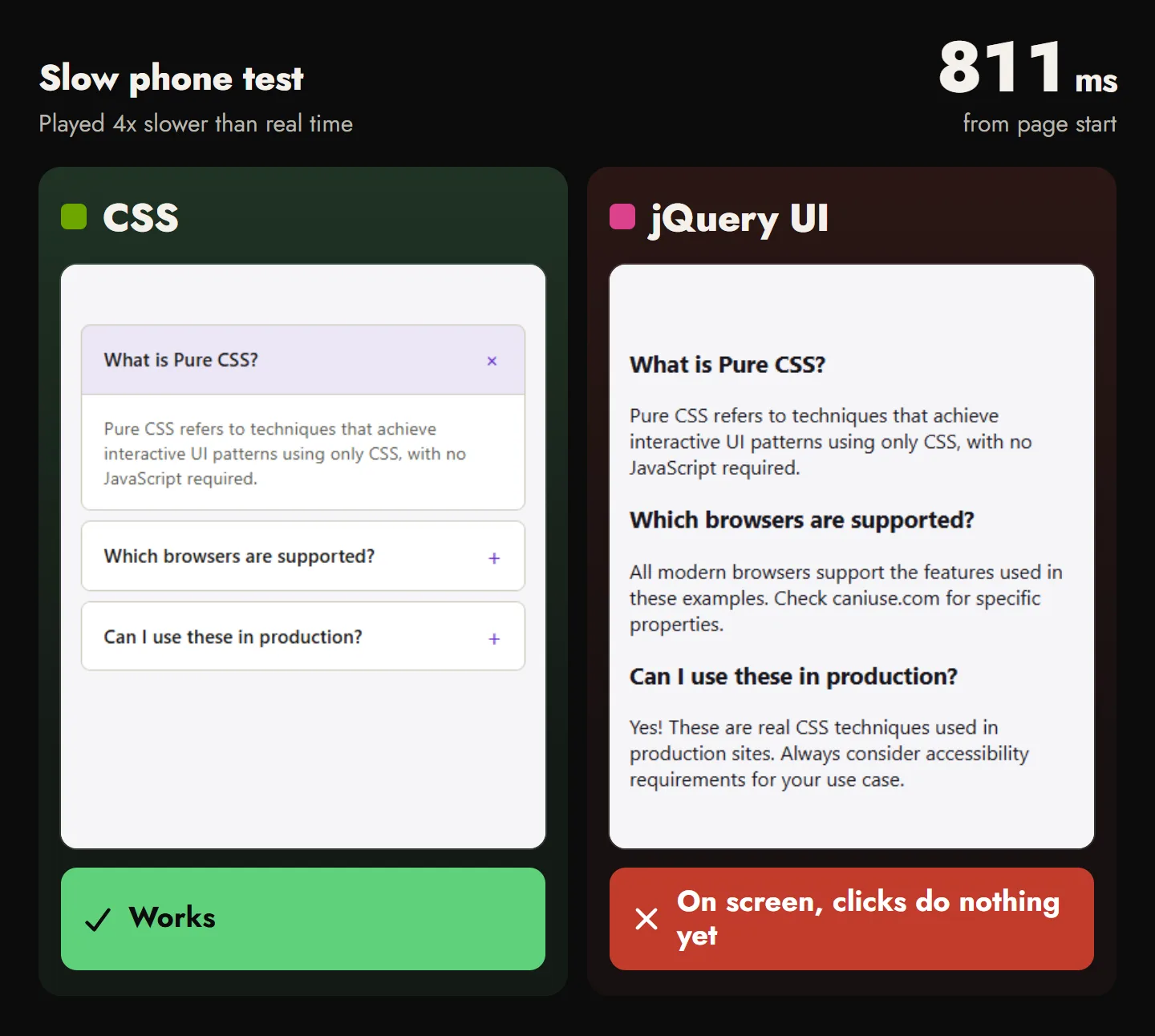
Nothing on screenOn screen, clicks do nothing yetWorks
With JavaScript off
See the numbers
| Version | First paint | Works at | Clicks do nothing for | JavaScript off |
|---|---|---|---|---|
| CSS | 31 ms | 31 ms | 0 ms | Works |
| Vanilla JS | 33 ms | 33 ms | 0 ms | Does not work |
| jQuery UI | 36 ms | 65 ms | 28 ms | Shows, clicks do nothing |
| jQuery UI, trimmed | 35 ms | 57 ms | 22 ms | Shows, clicks do nothing |
Nothing on screenOn screen, clicks do nothing yetWorks
With JavaScript off
See the numbers
| Version | First paint | Works at | Clicks do nothing for | JavaScript off |
|---|---|---|---|---|
| CSS | 455 ms | 455 ms | 0 ms | Works |
| Vanilla JS | 448 ms | 448 ms | 0 ms | Does not work |
| jQuery UI | 566 ms | 1,024 ms | 459 ms | Shows, clicks do nothing |
| jQuery UI, trimmed | 484 ms | 694 ms | 210 ms | Shows, clicks do nothing |
Nothing on screenOn screen, clicks do nothing yetWorks
With JavaScript off
See the numbers
| Version | First paint | Works at | Clicks do nothing for | JavaScript off |
|---|---|---|---|---|
| CSS | 29 ms | 29 ms | 0 ms | Works |
| Vanilla JS | 34 ms | 34 ms | 0 ms | Does not work |
| jQuery UI | 34 ms | 63 ms | 28 ms | Shows, clicks do nothing |
| jQuery UI, trimmed | 33 ms | 53 ms | 20 ms | Shows, clicks do nothing |
Main thread while loading
Blocking timeTie with Vanilla JSTie with Vanilla JSTie with Vanilla JS
The main thread's tasks in one typical run. A long task blocks any click that arrives during it.
Main thread taskPart past 50 ms: a long task
See the numbers
| Version | Starts at | Lasts | Long task |
|---|---|---|---|
| CSS | 0 ms blocking (median) | 0 ms script (median) | 0 long (median) |
| CSS task | 6.5 ms | 4.6 ms | |
| CSS task | 14 ms | 13 ms | |
| Vanilla JS | 0 ms blocking (median) | 0.6 ms script (median) | 0 long (median) |
| Vanilla JS task | 6.5 ms | 5.9 ms | |
| Vanilla JS task | 17 ms | 12 ms | |
| jQuery UI | 0 ms blocking (median) | 26 ms script (median) | 0 long (median) |
| jQuery UI task | 6.4 ms | 4.9 ms | |
| jQuery UI task | 18 ms | 13 ms | |
| jQuery UI task | 32 ms | 4.4 ms | |
| jQuery UI task | 39 ms | 5.3 ms | |
| jQuery UI task | 46 ms | 16 ms | |
| jQuery UI, trimmed | 0 ms blocking (median) | 21 ms script (median) | 0 long (median) |
| jQuery UI, trimmed task | 6.1 ms | 6.4 ms | |
| jQuery UI, trimmed task | 17 ms | 12 ms | |
| jQuery UI, trimmed task | 35 ms | 16 ms |
Main thread taskPart past 50 ms: a long task
See the numbers
| Version | Starts at | Lasts | Long task |
|---|---|---|---|
| CSS | 0 ms blocking (median) | 0 ms script (median) | 1 long (median) |
| CSS task | 188 ms | 26 ms | |
| CSS task | 392 ms | 61 ms | 11 ms past 50 ms |
| CSS task | 3,506 ms | 7.5 ms | |
| CSS task | 3,514 ms | 14 ms | |
| Vanilla JS | 0 ms blocking (median) | 1.8 ms script (median) | 1 long (median) |
| Vanilla JS task | 191 ms | 25 ms | |
| Vanilla JS task | 385 ms | 5.2 ms | |
| Vanilla JS task | 394 ms | 57 ms | 7.2 ms past 50 ms |
| Vanilla JS task | 454 ms | 5.7 ms | |
| Vanilla JS task | 3,549 ms | 9.2 ms | |
| Vanilla JS task | 3,559 ms | 14 ms | |
| jQuery UI | 34 ms blocking (median) | 131 ms script (median) | 2 long (median) |
| jQuery UI task | 191 ms | 27 ms | |
| jQuery UI task | 486 ms | 67 ms | 17 ms past 50 ms |
| jQuery UI task | 687 ms | 17 ms | |
| jQuery UI task | 884 ms | 5.4 ms | |
| jQuery UI task | 892 ms | 23 ms | |
| jQuery UI task | 918 ms | 4.5 ms | |
| jQuery UI task | 923 ms | 87 ms | 37 ms past 50 ms |
| jQuery UI task | 1,013 ms | 5.5 ms | |
| jQuery UI task | 1,133 ms | 4.0 ms | |
| jQuery UI task | 4,047 ms | 6.1 ms | |
| jQuery UI task | 4,053 ms | 6.9 ms | |
| jQuery UI, trimmed | 35 ms blocking (median) | 108 ms script (median) | 2 long (median) |
| jQuery UI, trimmed task | 183 ms | 23 ms | |
| jQuery UI, trimmed task | 415 ms | 62 ms | 12 ms past 50 ms |
| jQuery UI, trimmed task | 562 ms | 4.2 ms | |
| jQuery UI, trimmed task | 567 ms | 19 ms | |
| jQuery UI, trimmed task | 595 ms | 85 ms | 35 ms past 50 ms |
| jQuery UI, trimmed task | 682 ms | 6.1 ms | |
| jQuery UI, trimmed task | 3,674 ms | 9.5 ms | |
| jQuery UI, trimmed task | 3,684 ms | 8.3 ms |
Main thread taskPart past 50 ms: a long task
See the numbers
| Version | Starts at | Lasts | Long task |
|---|---|---|---|
| CSS | 0.9 ms blocking (median) | 0 ms script (median) | 11 long (median) |
| CSS task | 5.5 ms | 4.4 ms | |
| CSS task | 13 ms | 13 ms | |
| CSS task | 124 ms | 50 ms | 0.4 ms past 50 ms |
| CSS task | 224 ms | 50 ms | |
| CSS task | 323 ms | 50 ms | |
| CSS task | 421 ms | 50 ms | |
| CSS task | 518 ms | 50 ms | |
| CSS task | 613 ms | 50 ms | 0.1 ms past 50 ms |
| CSS task | 724 ms | 50 ms | 0.1 ms past 50 ms |
| CSS task | 819 ms | 50 ms | |
| CSS task | 915 ms | 50 ms | |
| CSS task | 1,012 ms | 50 ms | |
| CSS task | 1,121 ms | 50 ms | |
| CSS task | 1,217 ms | 50 ms | 0.1 ms past 50 ms |
| CSS task | 1,312 ms | 50 ms | |
| CSS task | 1,423 ms | 50 ms | 0.1 ms past 50 ms |
| CSS task | 1,519 ms | 50 ms | 0.1 ms past 50 ms |
| Vanilla JS | 0.8 ms blocking (median) | 0.6 ms script (median) | 12 long (median) |
| Vanilla JS task | 5.3 ms | 4.4 ms | |
| Vanilla JS task | 15 ms | 10 ms | |
| Vanilla JS task | 111 ms | 50 ms | 0.3 ms past 50 ms |
| Vanilla JS task | 211 ms | 50 ms | |
| Vanilla JS task | 311 ms | 50 ms | 0.1 ms past 50 ms |
| Vanilla JS task | 422 ms | 50 ms | |
| Vanilla JS task | 517 ms | 50 ms | |
| Vanilla JS task | 612 ms | 50 ms | 0.1 ms past 50 ms |
| Vanilla JS task | 723 ms | 50 ms | 0.1 ms past 50 ms |
| Vanilla JS task | 818 ms | 50 ms | 0.1 ms past 50 ms |
| Vanilla JS task | 914 ms | 50 ms | |
| Vanilla JS task | 1,011 ms | 50 ms | |
| Vanilla JS task | 1,121 ms | 50 ms | 0.1 ms past 50 ms |
| Vanilla JS task | 1,216 ms | 50 ms | |
| Vanilla JS task | 1,310 ms | 50 ms | |
| Vanilla JS task | 1,422 ms | 50 ms | |
| Vanilla JS task | 1,517 ms | 50 ms | |
| jQuery UI | 0.9 ms blocking (median) | 25 ms script (median) | 12 long (median) |
| jQuery UI task | 6.4 ms | 5.3 ms | |
| jQuery UI task | 19 ms | 12 ms | |
| jQuery UI task | 31 ms | 4.4 ms | |
| jQuery UI task | 39 ms | 4.9 ms | |
| jQuery UI task | 45 ms | 15 ms | |
| jQuery UI task | 113 ms | 50 ms | 0.2 ms past 50 ms |
| jQuery UI task | 226 ms | 50 ms | 0.1 ms past 50 ms |
| jQuery UI task | 327 ms | 50 ms | |
| jQuery UI task | 427 ms | 50 ms | 0.1 ms past 50 ms |
| jQuery UI task | 523 ms | 50 ms | 0.1 ms past 50 ms |
| jQuery UI task | 618 ms | 50 ms | 0.1 ms past 50 ms |
| jQuery UI task | 712 ms | 50 ms | |
| jQuery UI task | 824 ms | 50 ms | 0.1 ms past 50 ms |
| jQuery UI task | 919 ms | 50 ms | 0.1 ms past 50 ms |
| jQuery UI task | 1,015 ms | 50 ms | |
| jQuery UI task | 1,126 ms | 50 ms | |
| jQuery UI task | 1,220 ms | 50 ms | |
| jQuery UI task | 1,316 ms | 50 ms | 0.1 ms past 50 ms |
| jQuery UI task | 1,412 ms | 50 ms | 0.1 ms past 50 ms |
| jQuery UI task | 1,523 ms | 50 ms | |
| jQuery UI task | 1,620 ms | 50 ms | |
| jQuery UI, trimmed | 0.9 ms blocking (median) | 19 ms script (median) | 11 long (median) |
| jQuery UI, trimmed task | 6.9 ms | 5.3 ms | |
| jQuery UI, trimmed task | 17 ms | 12 ms | |
| jQuery UI, trimmed task | 36 ms | 14 ms | |
| jQuery UI, trimmed task | 119 ms | 50 ms | 0.3 ms past 50 ms |
| jQuery UI, trimmed task | 219 ms | 50 ms | |
| jQuery UI, trimmed task | 319 ms | 50 ms | |
| jQuery UI, trimmed task | 416 ms | 50 ms | |
| jQuery UI, trimmed task | 527 ms | 50 ms | 0.1 ms past 50 ms |
| jQuery UI, trimmed task | 623 ms | 50 ms | 0.1 ms past 50 ms |
| jQuery UI, trimmed task | 718 ms | 50 ms | |
| jQuery UI, trimmed task | 814 ms | 50 ms | |
| jQuery UI, trimmed task | 926 ms | 50 ms | |
| jQuery UI, trimmed task | 1,023 ms | 50 ms | |
| jQuery UI, trimmed task | 1,117 ms | 50 ms | |
| jQuery UI, trimmed task | 1,213 ms | 50 ms | |
| jQuery UI, trimmed task | 1,324 ms | 50 ms | 0.1 ms past 50 ms |
| jQuery UI, trimmed task | 1,419 ms | 50 ms | 0.1 ms past 50 ms |
| jQuery UI, trimmed task | 1,514 ms | 50 ms | |
| jQuery UI, trimmed task | 1,626 ms | 50 ms | 0.1 ms past 50 ms |
Shows on screen after a click
Shows after a clickTie with Vanilla JSTie with Vanilla JSTie with jQuery UI, trimmed
Every run is a dot. The line marks the median.
One runMedian
See the numbers
| Version | Median | Middle half of runs | Every run (ms) |
|---|---|---|---|
| CSS | 25 ms | 24 ms to 29 ms | 25, 24, 25, 22, 22, 24, 24, 25, 23, 25, 30, 32, 30, 29, 30 |
| Vanilla JS | 24 ms | 23 ms to 30 ms | 25, 23, 23, 23, 23, 22, 23, 44, 23, 24, 32, 31, 30, 30, 30 |
| jQuery UI | 24 ms | 23 ms to 29 ms | 25, 24, 22, 22, 24, 24, 23, 22, 24, 23, 31, 32, 33, 31, 28 |
| jQuery UI, trimmed | 25 ms | 23 ms to 29 ms | 25, 25, 23, 24, 23, 23, 23, 24, 24, 25, 31, 31, 29, 30, 29 |
One runMedian
See the numbers
| Version | Median | Middle half of runs | Every run (ms) |
|---|---|---|---|
| CSS | 39 ms | 38 ms to 49 ms | 41, 55, 48, 65, 40, 38, 39, 54, 38, 39, 37, 36, 38, 50, 39 |
| Vanilla JS | 54 ms | 44 ms to 56 ms | 54, 71, 45, 54, 56, 55, 40, 39, 55, 56, 40, 42, 63, 48, 57 |
| jQuery UI | 71 ms | 57 ms to 77 ms | 54, 72, 81, 81, 71, 90, 55, 74, 58, 71, 72, 54, 58, 80, 54 |
| jQuery UI, trimmed | 72 ms | 71 ms to 73 ms | 71, 71, 64, 72, 73, 72, 54, 73, 71, 70, 71, 74, 78, 72, 73 |
One runMedian
See the numbers
| Version | Median | Middle half of runs | Every run (ms) |
|---|---|---|---|
| CSS | 70 ms | 24 ms to 74 ms | 22, 71, 70, 24, 74, 42, 72, 24, 25, 74, 23, 23, 93, 74, 74 |
| Vanilla JS | 74 ms | 43 ms to 75 ms | 22, 25, 76, 74, 72, 75, 75, 44, 25, 74, 71, 93, 43, 92, 75 |
| jQuery UI | 71 ms | 24 ms to 74 ms | 23, 73, 74, 24, 23, 71, 74, 74, 25, 75, 79, 24, 22, 93, 24 |
| jQuery UI, trimmed | 24 ms | 23 ms to 74 ms | 22, 23, 76, 76, 74, 24, 24, 74, 76, 23, 71, 24, 74, 23, 23 |
Smoothness while it opens
Frames that changedTie with Vanilla JSjQuery UI winsTie with Vanilla JS
One typical run, from its first changed frame. A short tick marks a frame where the picture stayed the same.
Frame that changed the pictureFrame painted, picture stillLongest still stretch
See the numbers
| Version | Frames that changed | Longest still | Pictures | This run started moving at | Its frames (ms after it started) |
|---|---|---|---|---|---|
| CSS | 100% | 17 ms | 24 | 24 ms | 0, 17, 34, 50, 67, 83, 100, 117, 133, 150, 167, 184, 200, 217, 234, 250, 267, 283, 300, 317, 333, 350, 367, 383 |
| Vanilla JS | 100% | 17 ms | 24 | 23 ms | 0, 17, 33, 50, 67, 83, 100, 117, 133, 150, 167, 184, 200, 217, 233, 250, 267, 284, 300, 317, 333, 350, 367, 383 |
| jQuery UI | 96.2% | 33 ms | 25 | 24 ms | 0, 17, 50, 67, 84, 100, 117, 133, 150, 167, 183, 200, 217, 233, 250, 267, 283, 300, 317, 333, 350, 367, 383, 417 |
| jQuery UI, trimmed | 96.2% | 33 ms | 25 | 25 ms | 0, 17, 50, 67, 83, 100, 117, 133, 150, 167, 183, 200, 217, 234, 250, 267, 283, 300, 317, 334, 350, 367, 383, 400, 417 |
Frame that changed the pictureFrame painted, picture stillLongest still stretch
See the numbers
| Version | Frames that changed | Longest still | Pictures | This run started moving at | Its frames (ms after it started) |
|---|---|---|---|---|---|
| CSS | 96% | 33 ms | 24 | 39 ms | 0, 17 still, 33, 50, 67, 83, 100, 117, 133, 150, 167, 183, 200, 217, 233, 250, 267, 283, 300, 317, 333, 350, 367, 383, 400 |
| Vanilla JS | 96% | 33 ms | 24 | 42 ms | 0, 17 still, 33, 50, 67, 83, 100, 117, 133, 150, 167, 183, 200, 217, 233, 250, 267, 283, 300, 317, 333, 350, 367, 383, 400 |
| jQuery UI | 100% | 17 ms | 25 | 72 ms | 0, 17, 33, 50, 67, 83, 100, 117, 133, 150, 167, 183, 200, 217, 233, 250, 267, 283, 300, 317, 333, 350, 367, 383, 400 |
| jQuery UI, trimmed | 100% | 17 ms | 24 | 73 ms | 0, 17, 33, 50, 67, 83, 100, 117, 133, 150, 167, 183, 200, 217, 233, 250, 267, 283, 300, 317, 333, 350, 367, 383, 400 |
Frame that changed the pictureFrame painted, picture stillLongest still stretch
See the numbers
| Version | Frames that changed | Longest still | Pictures | This run started moving at | Its frames (ms after it started) |
|---|---|---|---|---|---|
| CSS | 69.2% | 67 ms | 18 | 72 ms | 0, 17, 33, 50, 67 still, 100 still, 117, 133 still, 150, 167, 183 still, 200, 217, 234, 250, 267, 283 still, 300, 317 still, 333, 350, 367, 383 still, 400 still, 417 |
| Vanilla JS | 68% | 50 ms | 17 | 93 ms | 0, 15 still, 32, 48 still, 65 still, 82, 98, 115, 132, 148 still, 182, 199, 215, 232, 248, 265 still, 282, 299, 315, 332, 349, 365 still, 382 still, 398, 415 |
| jQuery UI | 65.4% | 67 ms | 17 | 22 ms | 0, 17, 83, 100, 117, 133, 183, 200, 217, 233, 283, 300, 317, 333, 383, 400, 417 |
| jQuery UI, trimmed | 61.5% | 67 ms | 17 | 24 ms | 0, 17, 83, 100, 116, 133, 183, 200, 217, 233, 283, 300, 317, 333, 383, 400, 417 |
Measure by measure
- Against jQuery UI: CSS wins 8 of 11, ties 3, loses 0.
- Against jQuery UI, trimmed: CSS wins 8 of 11, ties 3, loses 0.
- Against Vanilla JS: CSS wins 4 of 11, ties 7, loses 0.
CSS ahead: far (3x or more), ahead (1.5x to 3x), slightlyTieJavaScript ahead, the same steps
Tie: the middle half of runs overlap, or the medians sit under 16.7 ms apart (one frame at 60 frames a second). Bytes and lines compare exactly. While both layout shift scores are under 0.1 (Google's line for good), the winner is slightly ahead at most.
| Measure | CSS against jQuery UI | CSS against jQuery UI, trimmed | CSS against Vanilla JS |
|---|---|---|---|
| Bytes downloaded | CSS far aheadCSS1.6 KBjQuery UI124.3 KB | CSS far aheadCSS1.6 KBjQuery UI, trimmed46.6 KB | CSS aheadCSS1.6 KBVanilla JS3.4 KB |
| JavaScript downloaded | CSS far aheadCSS0 KBjQuery UI95.7 KB | CSS far aheadCSS0 KBjQuery UI, trimmed33.6 KB | CSS far aheadCSS0 KBVanilla JS1.7 KB |
| Script time while loading | CSS far aheadCSS0 msjQuery UI26 ms | CSS far aheadCSS0 msjQuery UI, trimmed21 ms | TieCSS0 msVanilla JS0.6 ms |
| Blocking time | TieCSS0 msjQuery UI0 ms | TieCSS0 msjQuery UI, trimmed0 ms | TieCSS0 msVanilla JS0 ms |
| Time until it works | CSS aheadCSS31 msjQuery UI65 ms | CSS aheadCSS31 msjQuery UI, trimmed57 ms | TieCSS31 msVanilla JS33 ms |
| Layout shift while loading | CSS slightly aheadCSS0jQuery UI0.009 | CSS slightly aheadCSS0jQuery UI, trimmed0.009 | TieCSS0Vanilla JS0 |
| Shows after a click | TieCSS25 msjQuery UI24 ms | TieCSS25 msjQuery UI, trimmed25 ms | TieCSS25 msVanilla JS24 ms |
| Click response | TieCSS6.2 msjQuery UI9.3 ms | TieCSS6.2 msjQuery UI, trimmed12 ms | TieCSS6.2 msVanilla JS14 ms |
| Frames that changed | CSS slightly aheadCSS100%jQuery UI96.2% | CSS slightly aheadCSS100%jQuery UI, trimmed96.2% | TieCSS100%Vanilla JS100% |
| Works with JavaScript off | CSS far aheadCSSworksjQuery UIshows, clicks do nothing | CSS far aheadCSSworksjQuery UI, trimmedshows, clicks do nothing | CSS far aheadCSSworksVanilla JSdoes not work |
| Lines of code | CSS far aheadCSS116 linesjQuery UI24,954 lines | CSS far aheadCSS116 linesjQuery UI, trimmed9,691 lines | CSS aheadCSS116 linesVanilla JS212 lines |
- Against jQuery UI: CSS wins 10 of 11, ties 0, loses 1.
- Against jQuery UI, trimmed: CSS wins 10 of 11, ties 0, loses 1.
- Against Vanilla JS: CSS wins 4 of 11, ties 7, loses 0.
CSS ahead: far (3x or more), ahead (1.5x to 3x), slightlyTieJavaScript ahead, the same steps
Tie: the middle half of runs overlap, or the medians sit under 16.7 ms apart (one frame at 60 frames a second). Bytes and lines compare exactly. While both layout shift scores are under 0.1 (Google's line for good), the winner is slightly ahead at most.
| Measure | CSS against jQuery UI | CSS against jQuery UI, trimmed | CSS against Vanilla JS |
|---|---|---|---|
| Bytes downloaded | CSS far aheadCSS1.6 KBjQuery UI124.3 KB | CSS far aheadCSS1.6 KBjQuery UI, trimmed46.6 KB | CSS aheadCSS1.6 KBVanilla JS3.4 KB |
| JavaScript downloaded | CSS far aheadCSS0 KBjQuery UI95.7 KB | CSS far aheadCSS0 KBjQuery UI, trimmed33.6 KB | CSS far aheadCSS0 KBVanilla JS1.7 KB |
| Script time while loading | CSS far aheadCSS0 msjQuery UI131 ms | CSS far aheadCSS0 msjQuery UI, trimmed108 ms | TieCSS0 msVanilla JS1.8 ms |
| Blocking time | CSS far aheadCSS0 msjQuery UI34 ms | CSS far aheadCSS0 msjQuery UI, trimmed35 ms | TieCSS0 msVanilla JS0 ms |
| Time until it works | CSS aheadCSS455 msjQuery UI1,024 ms | CSS aheadCSS455 msjQuery UI, trimmed694 ms | TieCSS455 msVanilla JS448 ms |
| Layout shift while loading | CSS slightly aheadCSS0jQuery UI0.034 | CSS slightly aheadCSS0jQuery UI, trimmed0.034 | TieCSS0Vanilla JS0 |
| Shows after a click | CSS aheadCSS39 msjQuery UI71 ms | CSS aheadCSS39 msjQuery UI, trimmed72 ms | TieCSS39 msVanilla JS54 ms |
| Click response | CSS aheadCSS18 msjQuery UI44 ms | CSS aheadCSS18 msjQuery UI, trimmed47 ms | TieCSS18 msVanilla JS27 ms |
| Frames that changed | jQuery UI slightly aheadCSS96%jQuery UI100% | jQuery UI, trimmed slightly aheadCSS96%jQuery UI, trimmed100% | TieCSS96%Vanilla JS96% |
| Works with JavaScript off | CSS far aheadCSSworksjQuery UIshows, clicks do nothing | CSS far aheadCSSworksjQuery UI, trimmedshows, clicks do nothing | CSS far aheadCSSworksVanilla JSdoes not work |
| Lines of code | CSS far aheadCSS116 linesjQuery UI24,954 lines | CSS far aheadCSS116 linesjQuery UI, trimmed9,691 lines | CSS aheadCSS116 linesVanilla JS212 lines |
- Against jQuery UI: CSS wins 8 of 11, ties 3, loses 0.
- Against jQuery UI, trimmed: CSS wins 7 of 11, ties 4, loses 0.
- Against Vanilla JS: CSS wins 4 of 11, ties 7, loses 0.
CSS ahead: far (3x or more), ahead (1.5x to 3x), slightlyTieJavaScript ahead, the same steps
Tie: the middle half of runs overlap, or the medians sit under 16.7 ms apart (one frame at 60 frames a second). Bytes and lines compare exactly. While both layout shift scores are under 0.1 (Google's line for good), the winner is slightly ahead at most.
| Measure | CSS against jQuery UI | CSS against jQuery UI, trimmed | CSS against Vanilla JS |
|---|---|---|---|
| Bytes downloaded | CSS far aheadCSS1.6 KBjQuery UI124.3 KB | CSS far aheadCSS1.6 KBjQuery UI, trimmed46.6 KB | CSS aheadCSS1.6 KBVanilla JS3.4 KB |
| JavaScript downloaded | CSS far aheadCSS0 KBjQuery UI95.7 KB | CSS far aheadCSS0 KBjQuery UI, trimmed33.6 KB | CSS far aheadCSS0 KBVanilla JS1.7 KB |
| Script time while loading | CSS far aheadCSS0 msjQuery UI25 ms | CSS far aheadCSS0 msjQuery UI, trimmed19 ms | TieCSS0 msVanilla JS0.6 ms |
| Blocking time | TieCSS0.9 msjQuery UI0.9 ms | TieCSS0.9 msjQuery UI, trimmed0.9 ms | TieCSS0.9 msVanilla JS0.8 ms |
| Time until it works | CSS aheadCSS29 msjQuery UI63 ms | CSS aheadCSS29 msjQuery UI, trimmed53 ms | TieCSS29 msVanilla JS34 ms |
| Layout shift while loading | CSS slightly aheadCSS0jQuery UI0.009 | CSS slightly aheadCSS0jQuery UI, trimmed0.009 | TieCSS0Vanilla JS0 |
| Shows after a click | TieCSS70 msjQuery UI71 ms | TieCSS70 msjQuery UI, trimmed24 ms | TieCSS70 msVanilla JS74 ms |
| Click response | TieCSS3.6 msjQuery UI6.5 ms | TieCSS3.6 msjQuery UI, trimmed6.8 ms | TieCSS3.6 msVanilla JS4.1 ms |
| Frames that changed | CSS slightly aheadCSS69.2%jQuery UI65.4% | TieCSS69.2%jQuery UI, trimmed61.5% | TieCSS69.2%Vanilla JS68% |
| Works with JavaScript off | CSS far aheadCSSworksjQuery UIshows, clicks do nothing | CSS far aheadCSSworksjQuery UI, trimmedshows, clicks do nothing | CSS far aheadCSSworksVanilla JSdoes not work |
| Lines of code | CSS far aheadCSS116 linesjQuery UI24,954 lines | CSS far aheadCSS116 linesjQuery UI, trimmed9,691 lines | CSS aheadCSS116 linesVanilla JS212 lines |
The code
CSS takes more lines to write: 116 against 30 for jQuery UI. With jQuery UI's library code included, the total is 24,954 lines against 116 for CSS.
Lines of code
Lines of codeCSS wins
What you write, plus the library code the page loads, counted from the library's readable source.
You writeThe library bringsIn each version's color
See the numbers
| File | Kind | Lines |
|---|---|---|
| CSS: accordion.css | You write, CSS | 91 |
| CSS: index.html | You write, HTML | 25 |
| CSS total | 116 you write, 0 from the library | 116 |
| Vanilla JS: accordion.css | You write, CSS | 92 |
| Vanilla JS: accordion.js | You write, JavaScript | 82 |
| Vanilla JS: index.html | You write, HTML | 38 |
| Vanilla JS total | 212 you write, 0 from the library | 212 |
| jQuery UI: index.html | You write, HTML | 22 |
| jQuery UI: init.js | You write, JavaScript | 8 |
| jQuery UI: jquery-ui/dist/themes/base/jquery-ui.css | Library, CSS | 1,246 |
| jQuery UI: jquery/dist/jquery.js | Library, JavaScript | 7,877 |
| jQuery UI: jquery-ui/dist/jquery-ui.js | Library, JavaScript | 15,801 |
| jQuery UI total | 30 you write, 24,924 from the library | 24,954 |
| jQuery UI, trimmed: index.html | You write, HTML | 22 |
| jQuery UI, trimmed: init.js | You write, JavaScript | 8 |
| jQuery UI, trimmed: jquery/dist/jquery.js | Library, JavaScript | 7,877 |
| jQuery UI, trimmed: jquery-ui/themes/base/core.css | Library, CSS | 87 |
| jQuery UI, trimmed: jquery-ui/themes/base/accordion.css | Library, CSS | 23 |
| jQuery UI, trimmed: jquery-ui/themes/base/theme.css | Library, CSS | 426 |
| jQuery UI, trimmed: jquery-ui/ui/version.js | Library, JavaScript | 14 |
| jQuery UI, trimmed: jquery-ui/ui/keycode.js | Library, JavaScript | 42 |
| jQuery UI, trimmed: jquery-ui/ui/unique-id.js | Library, JavaScript | 43 |
| jQuery UI, trimmed: jquery-ui/ui/widget.js | Library, JavaScript | 624 |
| jQuery UI, trimmed: jquery-ui/ui/widgets/accordion.js | Library, JavaScript | 525 |
| jQuery UI, trimmed total | 30 you write, 9,661 from the library | 9,691 |
The jQuery UI version30 lines in 2 files
index.html22 lines
<!doctype html>
<html lang="en">
<head>
<meta charset="utf-8">
<meta name="viewport" content="width=device-width, initial-scale=1">
<title>Accordion: jQuery UI 1.14.2</title>
<link rel="stylesheet" href="/vendor/jquery-ui/dist/themes/base/jquery-ui.min.css">
</head>
<body>
<div id="accordion" class="demo-accordion">
	<h3>What is Pure CSS?</h3>
	<div>Pure CSS refers to techniques that achieve interactive UI patterns using only CSS, with no JavaScript required.</div>
	<h3>Which browsers are supported?</h3>
	<div>All modern browsers support the features used in these examples. Check caniuse.com for specific properties.</div>
	<h3>Can I use these in production?</h3>
	<div>Yes! These are real CSS techniques used in production sites. Always consider accessibility requirements for your use case.</div>
</div>
<script src="/vendor/jquery/dist/jquery.min.js"></script>
<script src="/vendor/jquery-ui/dist/jquery-ui.min.js"></script>
<script src="init.js"></script>
</body>
</html>init.js8 lines
// jQuery UI Accordion, initialized as its demo does (jqueryui.com/accordion/).
// One override: collapsible, so the open panel can be closed and none are open.
// Everything else, the 400ms "swing" animation included, is the library default.
$( function() {
	$( "#accordion" ).accordion( {
		collapsible: true
	} );
} );| File | Kind | Size |
|---|---|---|
jquery-ui.min.css | CSS | 7.4 KB |
jquery.min.js | JavaScript | 27.5 KB |
jquery-ui.min.js | JavaScript | 67.9 KB |
ui-icons_ffffff_256x240.png | Image | 6.4 KB |
ui-icons_444444_256x240.png | Image | 7.1 KB |
ui-icons_555555_256x240.png | Image | 7.1 KB |
| Total | 123.4 KB |
The trimmed build runs the same markup and init.js.
| File | Kind | Size |
|---|---|---|
jquery-ui.accordion.min.css | CSS | 2.6 KB |
jquery-ui.accordion.min.js | JavaScript | 5.9 KB |
jquery.min.js | JavaScript | 27.5 KB |
ui-icons_ffffff_256x240.png | Image | 3.3 KB |
ui-icons_444444_256x240.png | Image | 3.3 KB |
ui-icons_555555_256x240.png | Image | 3.3 KB |
| Total | 45.8 KB |
The vanilla JavaScript version212 lines in 3 files
A careful version with arrow, Home and End keys and a CSS height transition.
index.html38 lines
<!doctype html>
<html lang="en">
<head>
<meta charset="utf-8">
<meta name="viewport" content="width=device-width, initial-scale=1">
<title>Accordion: vanilla JavaScript</title>
<link rel="stylesheet" href="accordion.css">
<script src="accordion.js" defer></script>
</head>
<body>
<div class="demo-accordion" data-accordion>
	<div class="accordion-item">
		<h3 class="accordion-heading">
			<button type="button" class="accordion-trigger" id="faq-head-1" aria-expanded="true" aria-controls="faq-panel-1">What is Pure CSS?</button>
		</h3>
		<div class="accordion-panel" id="faq-panel-1" role="region" aria-labelledby="faq-head-1">
			<div class="accordion-body">Pure CSS refers to techniques that achieve interactive UI patterns using only CSS, with no JavaScript required.</div>
		</div>
	</div>
	<div class="accordion-item">
		<h3 class="accordion-heading">
			<button type="button" class="accordion-trigger" id="faq-head-2" aria-expanded="false" aria-controls="faq-panel-2">Which browsers are supported?</button>
		</h3>
		<div class="accordion-panel" id="faq-panel-2" role="region" aria-labelledby="faq-head-2" hidden>
			<div class="accordion-body">All modern browsers support the features used in these examples. Check caniuse.com for specific properties.</div>
		</div>
	</div>
	<div class="accordion-item">
		<h3 class="accordion-heading">
			<button type="button" class="accordion-trigger" id="faq-head-3" aria-expanded="false" aria-controls="faq-panel-3">Can I use these in production?</button>
		</h3>
		<div class="accordion-panel" id="faq-panel-3" role="region" aria-labelledby="faq-head-3" hidden>
			<div class="accordion-body">Yes! These are real CSS techniques used in production sites. Always consider accessibility requirements for your use case.</div>
		</div>
	</div>
</div>
</body>
</html>accordion.css92 lines
/*
 * Accordion, vanilla JavaScript version (purecss.com test rig)
 * The same look as the CSS version. accordion.js sets the panel height and
 * this file transitions it, with jQuery UI's default timing: 400ms "swing",
 * drawn here as cubic-bezier(0.37, 0, 0.63, 1).
 */

.demo-accordion {
	--surface: #ffffff;
	--border: #d0ccc0;
	--text: #1a1a1a;
	--text-muted: #5c5c55;
	--accent: #6f2fd6;
	--accent-dim: rgba(111, 47, 214, .08);
	--duration: 400ms;
	--easing: cubic-bezier(0.37, 0, 0.63, 1);
	display: flex;
	flex-direction: column;
	align-items: center;
	color: var(--text);
}

.demo-accordion .accordion-item {
	width: 100%;
	max-width: 560px;
	border: 1px solid var(--border);
	border-radius: 8px;
	margin-bottom: .5rem;
	overflow: hidden;
}

.demo-accordion .accordion-heading {
	margin: 0;
	font-size: inherit;
	font-weight: inherit;
}

.demo-accordion .accordion-trigger {
	width: 100%;
	margin: 0;
	border: 0;
	border-radius: 0;
	padding: .9rem 1.1rem;
	font: inherit;
	font-weight: 600;
	font-size: .95rem;
	text-align: left;
	color: inherit;
	cursor: pointer;
	display: flex;
	justify-content: space-between;
	align-items: center;
	background: var(--surface);
	user-select: none;
	transition: background var(--duration) var(--easing);
}

.demo-accordion .accordion-trigger::after {
	content: "+";
	font-size: 1.2rem;
	font-weight: 400;
	color: var(--accent);
	transition: transform var(--duration) var(--easing);
}

/* the item clips its corners, so the ring sits inside the button */
.demo-accordion .accordion-trigger:focus-visible {
	outline: 2px solid var(--accent);
	outline-offset: -2px;
}

.demo-accordion .accordion-trigger[aria-expanded="true"] {
	background: var(--accent-dim);
}

.demo-accordion .accordion-trigger[aria-expanded="true"]::after {
	transform: rotate(45deg);
}

/* the script sets a pixel height on this while it moves and clears it after;
   the padding is on .accordion-body, because padding here would not shrink
   to zero with the height */
.demo-accordion .accordion-panel {
	overflow: hidden;
	transition: height var(--duration) var(--easing);
}

.demo-accordion .accordion-body {
	padding: 1rem 1.1rem;
	font-size: .9rem;
	color: var(--text-muted);
	border-top: 1px solid var(--border);
	background: var(--surface);
}

@media (prefers-reduced-motion: reduce) {
	.demo-accordion .accordion-trigger,
	.demo-accordion .accordion-trigger::after,
	.demo-accordion .accordion-panel {
		transition: none;
		animation: none;
	}
}accordion.js82 lines
// Accordion, vanilla JavaScript version (purecss.com test rig).
//
// Header buttons carry aria-expanded and aria-controls; panels are role="region" and get the
// hidden attribute once they finish closing. One panel is open at a time, and clicking the open
// header closes it. The height moves with a CSS transition (accordion.css, 400ms): this file only
// measures the content and sets the start and end heights.
//
// Keys match jQuery UI 1.14.2's accordion: Down or Right moves to the next header and Up or Left
// to the previous one (wrapping), Home and End go to the first and last, and Ctrl+Up inside a
// panel goes back to its header. Enter and Space come with <button>, and every header stays in
// the Tab order.
'use strict';

for (const accordion of document.querySelectorAll('[data-accordion]')) {
	const triggers = Array.from(accordion.querySelectorAll('.accordion-trigger'));
	const panelOf = (trigger) => document.getElementById(trigger.getAttribute('aria-controls'));
	const triggerOf = (panel) => document.getElementById(panel.getAttribute('aria-labelledby'));
	const isOpen = (trigger) => trigger.getAttribute('aria-expanded') === 'true';
	const fallbacks = new Map();

	// the resting state: an open panel back to its natural height, a closed one hidden
	function settle(panel) {
		clearTimeout(fallbacks.get(panel));
		panel.style.height = '';
		panel.hidden = !isOpen(triggerOf(panel));
	}

	function toggle(clicked) {
		const opening = !isOpen(clicked);
		const closing = triggers.filter(isOpen); // includes the clicked header when it is open
		const toClose = closing.map(panelOf);
		const toOpen = opening ? panelOf(clicked) : null;
		const moving = toOpen ? toClose.concat(toOpen) : toClose;

		// Reads first. A panel at rest has height auto, which cannot transition, so it is pinned
		// to its pixel height before it closes; a panel caught mid-move already has a pixel
		// height, and its transition carries on from wherever it is.
		const ms = parseFloat(getComputedStyle(panelOf(clicked)).transitionDuration) * 1000;
		const resting = toClose.filter((panel) => !panel.style.height);
		const heights = resting.map((panel) => panel.scrollHeight);

		for (const trigger of closing) trigger.setAttribute('aria-expanded', 'false');
		if (opening) clicked.setAttribute('aria-expanded', 'true');

		// reduced motion: no transition runs, so no transitionend comes; go straight to the end
		if (!ms) {
			moving.forEach(settle);
			return;
		}

		resting.forEach((panel, i) => { panel.style.height = `${heights[i]}px`; });
		if (toOpen && toOpen.hidden) {
			toOpen.hidden = false;
			toOpen.style.height = '0px';
		}
		// one layout with every start height in place, so the changes below transition from it
		let target = 0;
		if (toOpen) target = toOpen.scrollHeight;
		else if (resting.length) void accordion.offsetHeight;

		for (const panel of toClose) panel.style.height = '0px';
		if (toOpen) toOpen.style.height = `${target}px`;

		// transitionend settles each panel; the timer covers a transition that never starts
		for (const panel of moving) {
			clearTimeout(fallbacks.get(panel));
			fallbacks.set(panel, setTimeout(settle, ms + 50, panel));
		}
	}

	accordion.addEventListener('click', (event) => {
		const trigger = event.target.closest('.accordion-trigger');
		if (trigger && triggers.includes(trigger)) toggle(trigger);
	}, { passive: true });

	accordion.addEventListener('transitionend', (event) => {
		if (event.propertyName === 'height' && event.target.classList.contains('accordion-panel')) settle(event.target);
	}, { passive: true });

	accordion.addEventListener('keydown', (event) => {
		if (event.altKey) return;
		const index = triggers.indexOf(event.target);
		if (index < 0) {
			const panel = event.ctrlKey && event.key === 'ArrowUp' && event.target.closest('.accordion-panel');
			if (panel) triggerOf(panel).focus();
			return;
		}
		if (event.ctrlKey) return;
		const next = { ArrowDown: index + 1, ArrowRight: index + 1, ArrowUp: index - 1, ArrowLeft: index - 1, Home: 0, End: triggers.length - 1 }[event.key];
		if (next === undefined) return;
		event.preventDefault();
		triggers[(next + triggers.length) % triggers.length].focus();
	});
}
When JavaScript still makes sense
You need arrow keys between headers.
<details>has no arrow, Home or End keys. jQuery UI and the vanilla version have them.You want every panel the same height.
jQuery UI sizes every panel to the tallest one by default, so the accordion keeps its height while switching panels. The CSS panels take their own height.
jQuery UI keeps only the open header in the Tab order (or the first header when none is open), so the other headers need the arrow keys. It also animates from script, which means it ignores the reduced motion setting.
Switching from jQuery UI
- Turn each header and the panel after it into one
<details>, with the header text in its<summary>. - Give every
<details>in the group the samename, so opening one closes the others. Unlike jQuery UI's default, the open panel can also be closed from its own header, leaving none open. - Add
opento the<details>that starts open. jQuery UI opens the first one unless you setactive. - Wrap the
<details>elements in a<div class="demo-accordion">, and give each panel's content a<div class="accordion-body">wrapper. - Copy the CSS. Its 400 ms matches jQuery UI's default duration.
- Delete the
.accordion()call, and deletejquery-ui.min.js(67.9 KB), the theme stylesheet (7.4 KB), its icons (20.6 KB), andjquery.min.js(27.5 KB) unless something else on the page needs them. - If your script listened for the
activateevent, listen fortoggleon each<details>instead.activatefires once per switch, after the animation completes.togglefires twice: once on the<details>that closes, once on the one that opens, each when its state changes.
jQuery UI settings in HTML and CSS
| jQuery UI setting | In HTML and CSS |
|---|---|
active | Add open to the <details> that should start open. Leave it off every panel to start with all closed. |
collapsible | The open panel can be closed from its own header, leaving none open. No CSS keeps one panel always open. |
header | The first child of each <details>, its <summary>. |
event | Opening a panel on hover so that it stays open has no HTML or CSS equivalent. |
icons | Draw the icon with summary::after. Rotate it with details[open] summary::after, or swap it for a second icon. |
animate | Set the duration and curve in --duration and --easing, used by the transition on ::details-content. |
classes | Add your own class names to the parts. |
beforeActivate | The toggle event fires after a <details> has already changed and cannot stop the change. |
Browser support
| Feature |  Chrome |  Firefox |  Safari |  Edge |
|---|---|---|---|---|
<details name="faq"> | 120 | 130 | 17.2 | 120 |
::details-content | 131 | 143 | 18.4 | 131 |
interpolate-size | 129 | No | No | 129 |
transition-behavior | 117 | 129 | 17.4 | 117 |
The figures come from MDN's browser compatibility data. In Firefox and Safari today, the panels open and close without the height animation because interpolate-size is not supported. In browsers older than Chrome 120, Edge 120, Firefox 130 and Safari 17.2, opening one panel no longer closes the others.
Questions
Can CSS replace a jQuery UI accordion?
<details name="faq"> keeps one panel open at a time and lets a reader close it, which is what collapsible: true does. What it lacks: arrow-key movement between headers, equal-height panels, and the height animation in Firefox and Safari.Is a CSS accordion faster than jQuery UI?
Does the CSS accordion work with JavaScript turned off?
How do I keep several panels open at once?
name off the <details> elements, so any number of panels can sit open.How do I make a panel open by default, or start with all closed?
open attribute sets which panel starts open. Without it on any panel, all start closed. In a name group, if more than one panel has open, only the first starts open.Does the panel resize when its content changes?
refresh is called.How do I build an accordion menu?
<details> elements with their own name for each group. The inner panels keep their state when their outer panel closes.